Layout blog template - where to change it?

Hi,

i am looking where i can change the look of my blogposts. Specifically:

  1. the colour and size of the header
  2. to get a bit more space between the header and the featured image.
  3. to make the featured image a bit smaller.
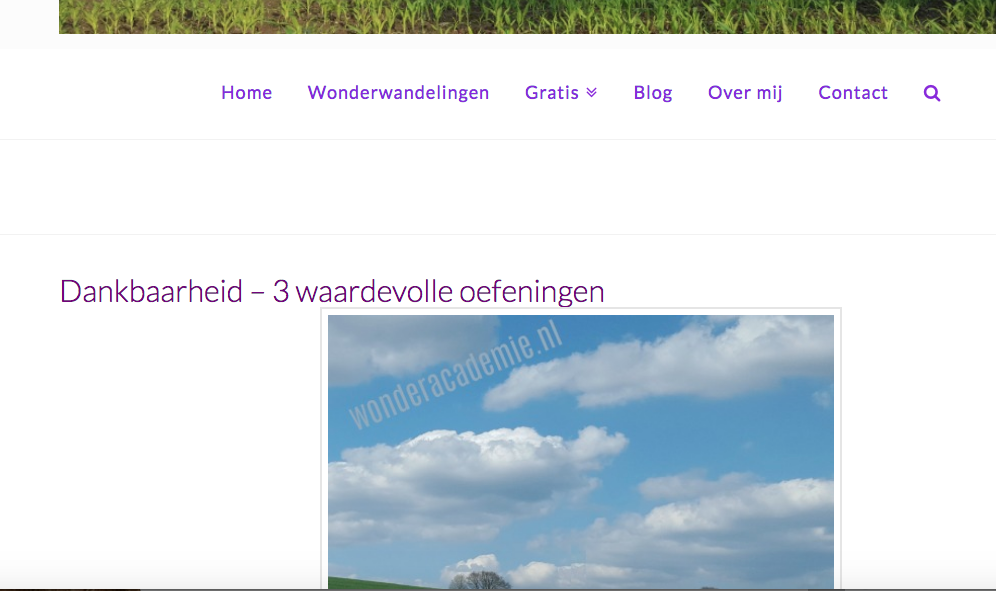
    i assume there is a template somewhere on my site but i cannot find it.
I add content via cornerstone. So, that i can customize per post if i would like that.
i changed the font weight in customizer and that is working across the board, so that is working well.

but it is the part of the header and featured image that is not working well.

my url: http://www.wonderacademie.nl/dankbaarheid-3-oefeningen/

thank you.

Hi There,

Please try adding this custom CSS under X > Theme Options > CSS:

.single-post .entry-header .entry-title {
    margin-bottom: 45px;
    color: #000;
    font-size: 40px;
}

@media (min-width: 980px){
    .single-post .entry-featured {
        width: 30%;
    }
}

Hope it helps :slight_smile:

yes, that makes a big difference. If I would like to make the picture a little bit bigger than this, what would be the place to do that?

and can you also give an answer where to change the fontsize and colour of the maintitle and the subtitles?

txs

.blog .x-header-landmark {
display: none;
}

this seemed to work, but after i checked again it is back to the old version.
i did save.
any other suggestion?

Hi There,

Where did you get that CSS code? That is not for changing font-size and color, but for hiding the landmark (the space between navigation menu and content)

Anyways, please look for this Custom CSS on your Theme Options > CSS and remove the semi-colon next to the cursive. It should be font-family: cursive !important; address this first or else few of your custom CSS will not work.

blockquote {
font-size: 20px;
font-family: cursive;
  !important;
}

On Thai’s code provided, feel free to adjust the width: 30%;

It’s in the code provided above.

.single-post .entry-header .entry-title {
    margin-bottom: 45px;
    color: #6e007f; /*change font color*/
    font-size: 40px; /*adjust font size*/
}

Please clarify what you’re referring as subtitles

Cheers!

This topic was automatically closed 10 days after the last reply. New replies are no longer allowed.