Launch Tomorrow can't figure this out. PLEASE HELP!

I have tried for hours to fix the following using Customize>Custom>CSS.

Please help :

1 - Contact Form text field background (where you type your info/input) color won’t change. Just want it plain white background.

2 - Contact 7 Form SUBMIT button colors won’t change - the main or the hover (Just want basic black and white or website button colors). Not sure where these colors are coming from

3 - Homepage (Section 1) looks perfect on Desktop but Mobile Version isn’t mobile responsive.

4 - How do I increase size of Social Media Icons in the footer

5 - How do I change the line color in the Footer Widget section (the lines above each of the Footer Widget Headers). I want to make it this color : d5b59c

Thank you in advance.
Hello. Please help.

It takes them about 24 hours to reply, sometimes a bit more. If you get a reply sooner than that consider yourself lucky. The reply is based on the last response. Because you replied 15min ago (and myself now) the 24 hours will begin from your last reply (15min ago and not 15 hours ago). I hope I helped, dont reply to this.

Hello @TheHustleAgency

Thanks for writing to us.

For question number 1 & 2

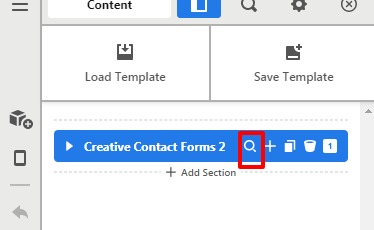
Go to the Contact page and edit the page —>Click on the magnifier icon to inspect the settings—>Click on the Customize —>Element CSS. All the styling of the contact Forms is rendering from here. You can change the styling from here.

Contact-Us-Content-Xw

For question number 3

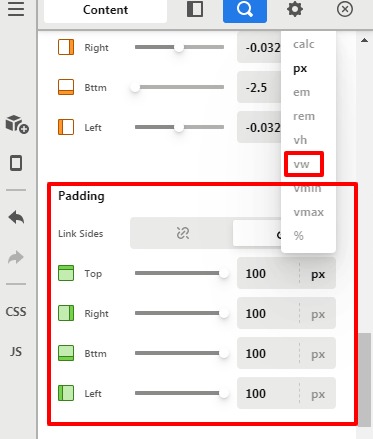
Go to the Homepage Section —>Click on the magnifier icon to inspect the settings—>Go to the padding setting and set the padding in the VW unit. You have set 100px padding that is comprising the Row width and column width.
BBco-Content-X

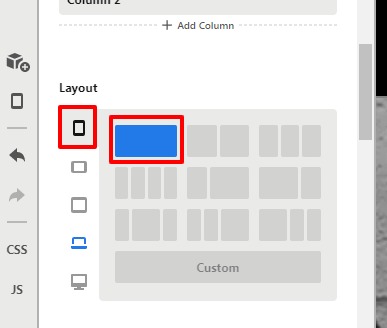
I would also suggest you go to the Row setting and set the column as 1 column in the smaller device like phone and tablet.
BBco-Content-X1

For question number 4

To increase the font-size of the social media icon you need to add this custom CSS code under X—>Theme option —>CSS

.x-colophon.bottom .x-social-global a {
font-size: 25px;
}

Please feel free to change the font-size as per your design

For question number 5

To change the widgets section line colour you need to add this custom CSS code under the X—>Theme option —>CSS

.widget:before {
background-color: #d5b59c !important;
}

The purpose of providing the custom CSS to show you how to add CSS code to your site. Writing custom CSS is outside the scope of our theme support. If you need more customization, you need to learn CSS and learn how to use the browser’s element inspector.

Hope it helps.
Thanks

This topic was automatically closed 10 days after the last reply. New replies are no longer allowed.