Landing page and address does not display correctly when URL is shared on social media, or on mobile devices

Hi,

The page “snapshot” that displays when I want to share my home page URL on Facebook includes the words “demo” in front of the Home page address, and shows layout elements that I have deleted from the Integrity stack (child theme) during design of my home page. These deleted elements also show when I check it on a mobile device, but is not on my landing page when I open the website on my laptop. I have cleared all caches numerous times, and use the WP touch plugin.

Thanks!

Hello There,

Thanks for writing in!

I have checked your site using facebook Debugger and it appears that it displays the older cache version of your site dated July 30.

I have scraped the content again so that it will be updated.

Please go to your Yoast SEO plugin settings and make sure to add a default or fallback image so that the image will be displayed when shared in the social network like Facebook. For more help, please check this out:


Hope this helps.

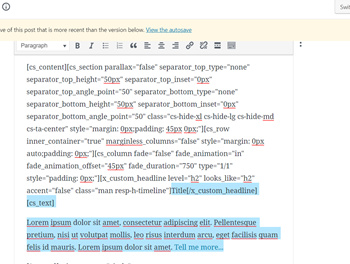
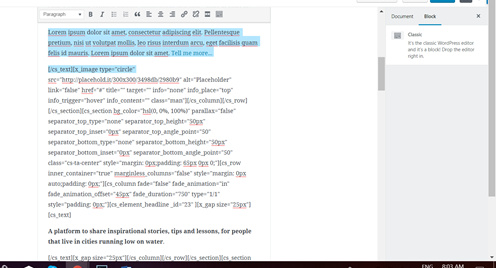
Hi! Thanks a heap! I’m having some success, but the problem is still not resolved - the mobile display is the bigger headache at the moment. However, I’ve had a look at the code for the homepage, and I see the redundant copy and reference to the ‘deleted’ circles in layout still there - this must be the problem. I’m not confident enough with html to know which code to delete to not mess up anything else on the home page.

Is there a way that you can help me delete exactly the right stuff? It’s the stuff in the beginning of the bits that I’ve deleted in Cornerstone, but is still showing in the code:

and the end:

The copy “A platform to share etc etc…” is from where it shows on the landing page (correctly) at the moment (text over an image).

SO much hard work into this site already. I badly don’t want to mess it up.

Thanks!

Hi @Petro,

Is this still related to Facebook sharing issue?

And are you using cornerstone builder when you created the content? As I recommend deleting the element or section there instead of editing that shortcode. Any chance you’ll add to that area will be discarded once you switch to cornerstone builder again.

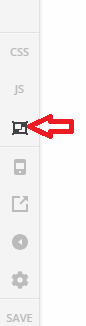
And you can see all contents of the builder by switching to Skeleton mode. And there you can delete section, rows, or elements that you wish to delete.

Thanks!

Hi Rad,

It applied to the Facebook issue as well as the mobile responsiveness. I used Cornerstone when I created the page - that’s why I did not see the redundant code on the back-end of the page. However, I could now also see the problematic elements in Skeleton mode, and have deleted them. Thanks! The Facebook display is still not correct though. I have followed the advice according to the earlier sent articles too (also thanks!). Any other suggestions? Maybe give it all some time to settle in? :confused:

Hello @Petro,

Thanks for updating the thread.

I checked the Facebook debugger and scraped your website, it’s still showing the placeholder image. Just wanted to confirm that have you followed the instructions mentioned in the first article link shared by @RueNel? Article share image should not take much of time to update. Please make sure you have added a fallback image. I also suggest you to try adding a Facebook image (Yoast SEO) under article and see if that works, just to narrow down.

Thanks.

This topic was automatically closed 10 days after the last reply. New replies are no longer allowed.