Hello Kyle,
I have logged in to your site to look for the error. I could not find anywhere where you added this custom JS code. Did you remove it? If you removed it, I am still seeing it. When I checked the plugins section, WP Hummingbird is already disabled. When I open the page in a private browsing mode, I am still seeing the cache generated by the WP Hummingbird. This is weird and could be a caching issue.
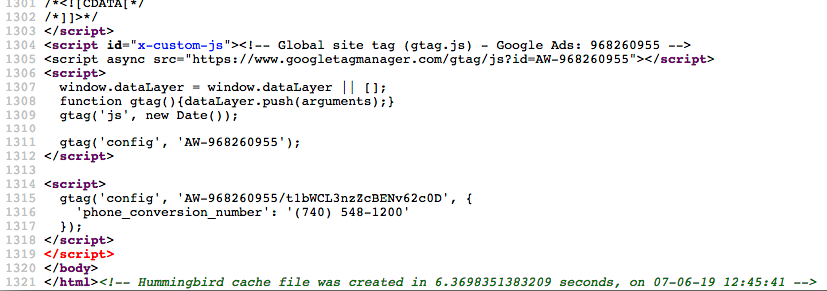
Anyway, if you plan on adding the JS script back, please install “Insert Headers and Footers” plugin which you can get in the WordPress plugins section (https://wordpress.org/plugins/insert-headers-and-footers/). You will need to insert the JS code in the footer section provided by the plugin.
<!-- Global site tag (gtag.js) - Google Ads: 968260955 -->
<script async src="https://www.googletagmanager.com/gtag/js?id=AW-968260955"></script>
<script>
  window.dataLayer = window.dataLayer || [];
  function gtag(){dataLayer.push(arguments);}
  gtag('js', new Date());

  gtag('config', 'AW-968260955');
</script>

<script>
  gtag('config', 'AW-968260955/t1bWCL3nzZcBENv62c0D', {
    'phone_conversion_number': '(740) 548-1200'
  });
</script>
Please let us know how it goes.

