Issues Using Video Element in Cornerstone

Hi, I’m working on a website and I’ve used the ‘Video’ element (not the classic version) and when I go back in to edit the page I’ve put it on, the whole page isn’t displaying as it should. None of the images/videos are showing and the text is the default setting and not what I’ve styled it as. It’s displaying as it should on the front end, but my client will be updating this page and it needs to be working as it should! When I remove the element, save the page and refresh it, it displays as it should do. Is this a glitch from the update that was made a few months back?

Also, when you view the ‘Watch & Read’ page, the videos are justified to the left and I wanted them to be centred - I’ve set the column to be centred but it doesn’t change it. Would you be able to help me out with this?

I’ll include all the login details and URL etc in a secure note as I’ve currently got the maintenance page on.

Thanks!
Hey @core365,

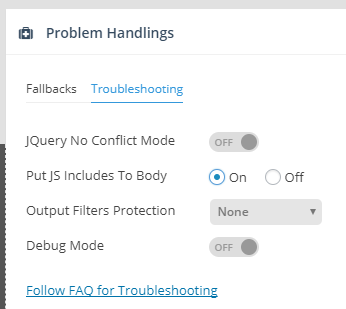
There’s a conflict with Slider Revolution. The solution is to put the JS in the body. That is under your slider’s Problem Handlings settings.

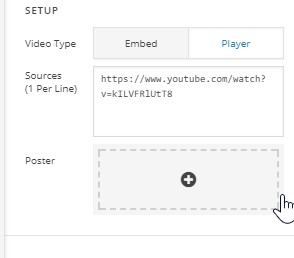
Your video setup is also incorrect. You placed the Youtube URL in the Player mode.

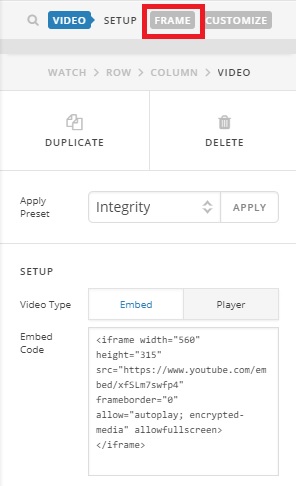
Please use the Embed mode and get the video embed code from YouTube.

Thanks.

Hi, thanks for the info! I’ve done what you said to do, and even though the slider isn’t displaying in Cornerstone, everything else is displaying as it should. However, the videos are still justified to the left of the column instead of being centred. Is there a way around this?

Thanks!

Hi there,

I checked and it looks okay, but I think I now know what you mean. It could be because of the max width option of the video. Please inspect your video again and go to frame section, then set the max-width to 100% instead of 500px.

Thanks!

Yep, that did it, thanks! I haven’t used that element before and didn’t realise there was the Frame section!

Many thanks!

You’re most welcome.

This topic was automatically closed 10 days after the last reply. New replies are no longer allowed.