Issue With Text Editor When Creating a Post

When creating a post, I am unable to switch to Text View and the quick tags bar is not visible. I am able to create a post and it will show up on the designated Posts page.

I have tried deactivating all plugins. My memory allotment has been set in the wp-config file. Per my host I have added the code in the htaccess file to run PHP7 and I have resaved permalinks. Here is what it looks like when creating a post. There is text in the body field but it is white.
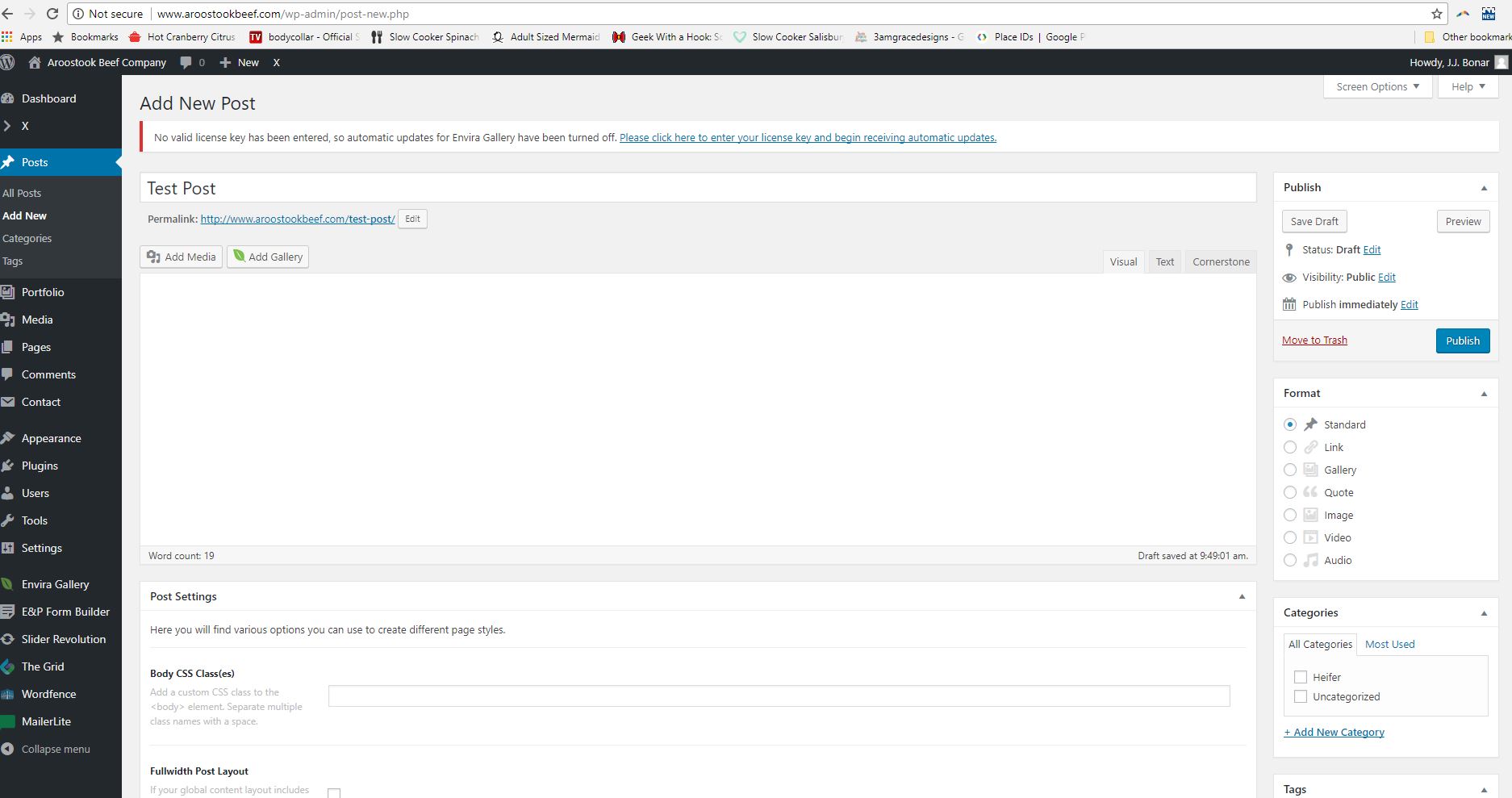
You can view the published post here: http://www.aroostookbeef.com/aroostook-beef-blog/

Hi there,

There are JS errors when I checked the console that which is why you are not able to switch to text mode. Would you mind temporarily deactivating all the third party plugins so that we can investigate further?

Also, please try adding this code in wp-config.php:

define('CONCATENATE_SCRIPTS', false);

Let us know how it goes.

Deactivating all plugins except Cornerstone and adding that code to the wp-config.php and everything now works as it should.

Glad to hear it’s sorted.

Cheers!

Reactivated all plugins went back in and it’s now working.

Thank you.

You’re most welcome.

This topic was automatically closed 10 days after the last reply. New replies are no longer allowed.