I am working on a client site that has a Pro header setup using the Cart Dropdown element. I need the buttons that are active when product is in the cart to be active visible at all times. I’ve attempted to resolve using CSS but I’ve not had any luck so far. Any help would be greatly appreciated.
I’ve been able to add the cart item count to our header via Dynamic Content. The problem I am having now with the dropdown is the lack of information display on the home page but the element works fine on the rest of the pages. Please advise.
Hey @jeremyMuse,
Glad to hear that you’ve found a solution to the first issue. Regarding the other one:
Would you mind telling us what exactly you’re expecting?
Thanks.
We’re having issues with no items showing in the cart dropdown on the home page when there are items in the cart. Also, I’d really like to add a “no items in cart” message to the dropdown. I’d also like to have the button container visible at all times not just when there are products in the cart.
URL for the live site is https://buckinghammfg.com
My dev site is at https://staging3.buckinghammfg.com
Hey @jeremyMuse,
If there’s no item in your cart, there is a text saying that there’s no items.

I tested adding a product to the cart and it’s showing up too.
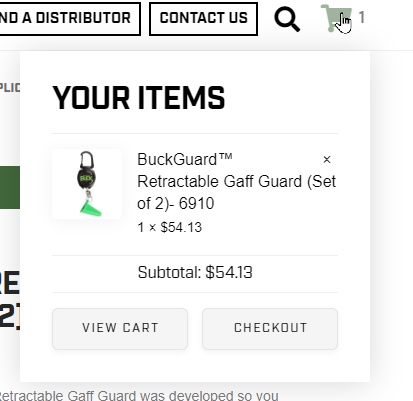
Would you mind providing a screenshot of the “button container”?
Thanks.
I’ll do you one better. Here’s a short video of the issue.
https://www.dropbox.com/s/ekjtjv6dvegnud8/New%20Tab%20-%20Google%20Chrome%202020-02-13%2011-01-42.mp4?dl=0
This was after purging all history and cookies using Chrome. The issue is the same in all browsers. When we jump back to the home page, we lose the functionality altogether in the header and the footer. Using Pro Headers, regular footers.
Hello @jeremyMuse,
Your having a caching issue. I can see that you have installed WP Rocket. Please clear your plugin cache or temporarily deactivate WP Rocket plugin and test your site again. To properly use Wp Rocket with WooCommerce, please check this out:
- https://docs.wp-rocket.me/article/27-using-wp-rocket-on-your-ecommerce-site
- https://wp-rocket.me/blog/using-woocommerce-dynamic-cart-wp-rocket/
Hope this helps.
We worked with the caching system and have not been having any luck as of yet. Is there a possibility it is giving us problems due to it being on the Frontpage? This is what we got from our hosting:
I have created a backup of your website database, your plugins and theme files and then deactivated all your plugins except the WooCommerce one, however the problem persist. I have also cleared your website cache and deactivated the caching from the SuperCacher tool located at your cPanel.
Further reviewing the server logs, your website does not generate any particular errors upon adding a product to your card and then navigating to your home page. I have also reviewed your home page via the Inspect Elements feature on my browser and whenever I click on the cart, the following message is displayed:
Code:
focused!!
At this point I am unable to tell what causes the problem as the issue is present without any active plugins and no errors are being recorded neither at the server error logs nor at the Inspect Elements feature.
I would advise you to consult with a website developer who can inspect your website code and pinpoint what is causing the problem.
If you do not have a website developer, you can check our article which explains how you can find one:
You can also consult with our Codeable partners which can assist you with the investigation.
Currently we have a promotion from which you can benefit in case you choose our Codeable partners. There is a $60 voucher which you can get from your User Area > Perks tab > Dev Tools & Services > click on the Get Credit banner.
There is a $60 voucher which you can get from your Client Area > Marketplace > Partner Perks > click Get on the Codeable voucher.
You can also find additional information about our Codeable partners from the following blog post:
I have reverted all the changes performed during my investigation.
If you have any further questions, please do not hesitate to contact us back.
Best Regards,
Ivan Tanev
Technical Support Team
Hello @JeremyMuse,
Thanks for updating in! To better assist you with your issue, kindly provide us access to your site so that we can check your settings. Please create a secure note with the following info:
– Link to your site
– WordPress Admin username / password
To know how to create a secure note, please check this out: https://theme.co/apex/forum/t/how-to-get-support/288

Best Regards.
Hi @ruenel -
I’m giving you credentials for our live site. If you are going to need to deactivate plugins or change themes to test, I would greatly appreciate a heads up. We are smack in the middle of our busiest day of the week and we also are presenting at a trade show so we can’t afford the interruption. See the secure note for attached credentials.
Thanks!
Hi Jeremy,
I just tried it on freshly installed Wordpress with the same version of your Pro theme and it has no issue similar to your site. You can check it from the demo site I’ll provide in the secure note.
I like to test your site but since your site is a live one, then I’m not going to deactivate anything from it as there are cases it went wrong just deactivating a plugin, especially some plugin do a cleaning (deletion of settings and data) after deactivation. Would you mind creating a clone of your live site, perhaps on a sub-domain, and make sure they are a separate copies? We’ll check it there.
Thanks!
I was able to finally get a chance to create the dev site for you to test. I have confirmed that the issue persists on the install. It is a complete copy of the current live site. Please have a look and let me know what you find. The credentials sent in the previous secure note are active on this site as well.
Hey @jeremyMuse,
In your staging site, I’ve cleared all caches and deactivated all plugins except Ubermenu and WooCommerce. This made the Cart element work but not the Cart Widget.
I then switched to the parent theme and this fixed the Cart Widget. You can see that in the screencast below.
The bottomline here is, the issue is not caused by our theme. If the issue will persists even without plugins and the parent theme, this means that it is the aggressive caching in your server that is causing the issue. Deactivation of plugins and switching of themes could have forced caches to clear.
Please consult with your host with this new finding.
Thanks.
This topic was automatically closed 10 days after the last reply. New replies are no longer allowed.