Issue with Menu Item Alignment

Hi there,

Our Adventure Centre’s website is built using X.

We use the Stack Integrity, and don’t have much special customistion.

We do have a custom font and italics.

The issue is with the menu item alignment.

The Items that have a dropdown are arranged slightly higher than the items that have no dropdown, as it is right in the menu it looks really unprofessional.

You can see it here:

I need to do something to align it, I’ve asked before but no-one could help. We have people comment on it all the time and something needs to be done.

Can you please help us get the Menu aligned straight??

the site is https://www.evergreen-alpineacademy.com

I’ll post login details in a Secure Note.

Thanks in advance!
Hi @freedomdesign,

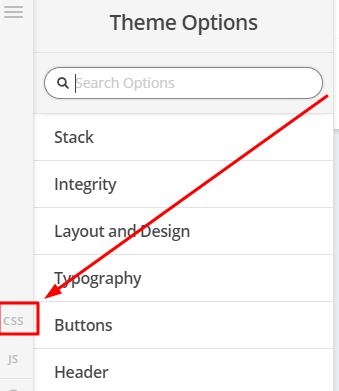
To fix the alignment, you can add this in Theme Options > CSS

.x-navbar .desktop .x-nav li>a>span:after {
    vertical-align: middle;
}

Hope that helps

Hi @paul.r

Thanks for the quick reply.

This increased the height of the items with dropdown icons, the item that has no dropdown is still slightly higher, is there any way to align them just a little more?

It’s so close!

Hello @freedomdesign,

Thanks for updating the thread. :slight_smile:

I checked the website and cleared the cache. I don’t see the issue wherein menu with no dropdown is showing above menu that has dropdown.

Please try clearing cache and see how it goes.

Thanks.

Hi @Prasant

I have cleared cache…while the difference is slight, the item with no dropdown is a few pixels higher than the others…

Thanks in advance for looking at this!

Hi @freedomdesign,

It could be the font you’re using. Can you please switch to another font(or turn off the bold of font weight) to check the issue persists or NOT?

Thank you.

Hi @thai

Yes, it’s definitely to do with the font and italics. The fix you’ve provided is close enough to perfect - I was hoping for a little more code so I could drop the Menu Items with no drop-down arrows a few pixels down. but it’s close enough.

Thanks for your help!

Hi @freedomdesign,

If you would like to adjust the alignment, you can add the code below in Theme Options > CSS

.x-navbar .desktop .x-nav > li.menu-item-has-children > a {
       margin-top:-1px;
}

You may change -1px

Hope this helps

@paul.r - This is perfect…thanks so much!!!

You are most welcome. :slight_smile:

This topic was automatically closed 10 days after the last reply. New replies are no longer allowed.