I have deleted file of the logo from THEME OPTIONS - HEADER as the photo shows.
I have deleted file of the logo stored in the media library.
Still the logo shows on all pages.
Ideas?

I have deleted file of the logo from THEME OPTIONS - HEADER as the photo shows.
I have deleted file of the logo stored in the media library.
Still the logo shows on all pages.
Ideas?
Hello @giusep71,
Thanks for writing in!
I checked the website and can see that you are using header builder. I also see that logo has been added in header builder. To remove the logo from Header builder, please navigate under Pro > Header and delete the image Element.
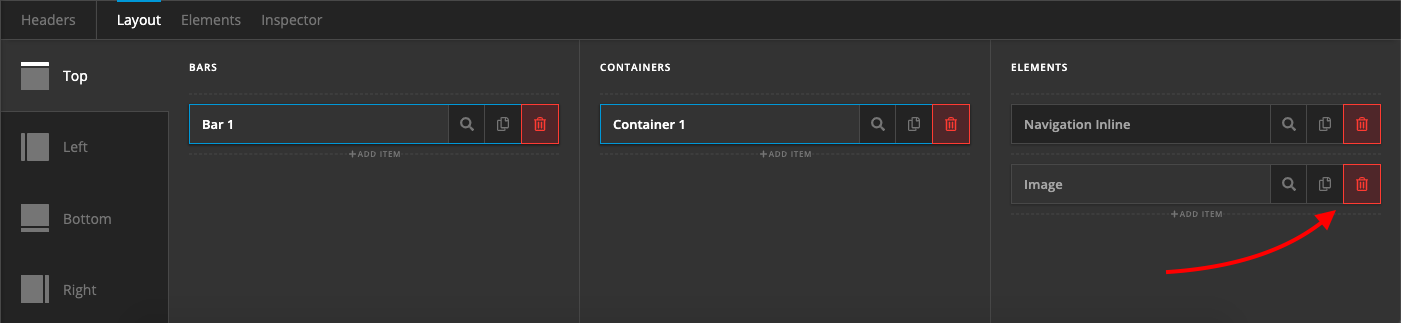
Thanks.
Thanks. That works.
Although I found out sort of a glitch on the header. Somehow there’s an element of the menu (a copy apparently), no clue where it comes from, hiding behind the logo.
Can you help?

Hi There @giusep71
I have tested your site, but I could not see any similar issues on your header.

Please make sure to clear all caches when testing your issue again. You can refer to the following resource for that (https://www.wpbeginner.com/beginners-guide/how-to-clear-your-cache-in-wordpress/).
Let us know how it goes.
Thanks!
Thanks a lot.
All fixed
Hi guys. I’ve noticed the logo won’t work on mobile, iPhone for instance. When clicking on it nothing happens. Are there settings to be enabled for the mobile version of the theme?
Thanks
Hello @giusep71,
Your logo for the smaller screens does not have any link attached on it. Please edit your header and make sure to insert the link for your logo image instead.
Please let us know how it goes.
Hi. Sorry but I’m not sure where the link should be added as well. Can you tell?

Hello @giusep71,
That is the logo image for larger screens. Please check the header in smaller screen by way of clicking the phone icon in the left panel or use the skeleton mode so that you will find your other logo image which is intended for smaller screens. That logo image needs a link.
If you cannot find it, please provide access to your site so that we can edit it for you.
Best Regards.
Outstanding.
Thanx
You are most welcome!
Here we are again 
It seems the logo is visible on Chrome, and not showing on Safari. Cleared cache, checked links etc. Can’t seem to find a way thgough.
Can you help?


Hi @giusep71,
It’s not loading on my Chrome browser as well:

The logo URL returns 404 error now: https://www.houseinabruzzo.com/wp-content/uploads/2019/04/Logo.png
Can you share us with your admin account so we can take a closer look?
Thank you.
You can access now.
Thanks for taking a look
Hi There @giusep71
Upon checking your issue further, it seems that some of your media library image files are missing or corrupted.

You will need to re-upload those images to resolve this issue.
Thanks!
Hi. And by re-uploading the files, you’re saying the issue with the logo goes away?
Thanks
Hi There @giusep71
As mentioned by @thai earlier, we’re getting error 404 when accessing your logo image path. Which means either your logo file is corrupted or missing.
https://www.houseinabruzzo.com/wp-content/uploads/2019/04/Logo.png
You can upload the logo file to the same file path or you can re-upload within your media library and that should resolve your issue.
Let us know how it goes.
Thanks!
I have re-uploaded the logo file and so far it seems to be working well.
I appreciate your help. Thanks
Glad to hear everything is working now
