Issue with headline feature list

Hi guys!
can you please help me with this layout in the screenshot?
It’s never been like that, with so much space between the headlines. Today out of the blue it came out like this.

How can I reduce it?

thanks a lot
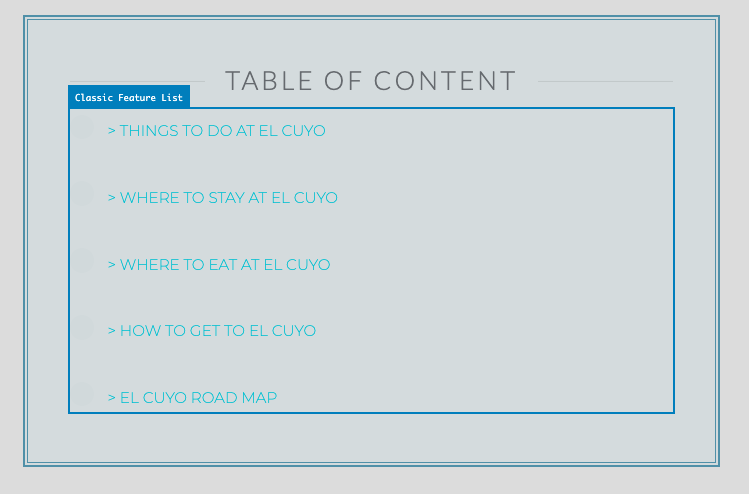
this is the original post https://www.boundlessroads.com/cuyo-one-hidden-treasure-yucatan/

cheers
isabella

Hello Isabella,

Thanks for writing in!

Please add following CSS under X > Theme Options > CSS:

.x-feature-list .x-feature-box.middle-text>div {
    padding: 0.2em 0 !important;
}

1- I have found the proper CSS code selector using the Chrome browser Developer Toolbar: https://www.youtube.com/watch?v=wcFnnxfA70g

2- For the CSS code itself, I suggest that you get started with this tutorial: https://www.youtube.com/watch?v=yfoY53QXEnI

Thanks.

Thanks for the information and the tutorial link.
However my problem is that I didn’t know that I needed to use a code.

I thought it was an error because the default settings don’t make sense. There is too much space.
In fact. to be honest, it was always been ok by default until today when I checked and it totally changed it by itself

Hi Isabella,

If you have set the Vertical Alignment of the feature list element to top, there will be no space added around each item.

Since you have set the vertical alignment of the element to middle, this default theme CSS takes effect:

.x-feature-list .x-feature-box.middle-text>div {
    padding: 1.075em 0;
}

That is why in order to override the default CSS, the suggested custom CSS needs to be added.

Hope this explains it.

hey there!
I am afraid it wasn’t me because I don’t even know where this option is. …:frowning:

Also I realized that all the H1-H2… dimensions have suddenly changed to gigantic. I didn’t touch anything.

This is so weird

Hi Isabella,

Please remove the code given in the previous replies.
Have the code updated and use this custom css instead:

.my-feature-list .x-feature-box-connector.upper,
.my-feature-list .x-feature-box-connector.lower,
.my-feature-list .x-feature-box-graphic-inner,
.my-feature-list .x-feature-box-title {
    display: none;
}

.my-feature-list .x-feature-box-text {
    margin-top: 0;
    line-height: 1em;
}

Hope this helps. Please let us know how it goes.

Thanks I have further reduced the space to 0.5em.
that’s fine now.
thanks a lot
cheers
:slight_smile:

You’re welcome!
Thanks for letting us know that it has worked for you.

This topic was automatically closed 10 days after the last reply. New replies are no longer allowed.