Issue with custom element

Hello team,

I have a lot of trouble to use the primer and reference guides to program custom Cornerstone elements.

Here is for example one that I am working on:

<?php
// Load helpers
require_once(ITU_HELPERS . 'build-checkbox-list.php');

$checkboxes = new buildCheckboxList('quote_category');

cs_define_values('checkboxes', $checkboxes->get_defaults());

// Register "ITU Post based Carousel"
cs_register_element('itu-quotes-carousel', array(

    // Define a localized title of your element and how it is labeled in the Element Library
    'title' => __('ITU Quotes Carousel', 'itu-text-domain'),

    // Define some values that we want to let users customize for this element
    'values' => cs_compose_values('checkboxes'),

    // ​Define the control navigation used to organize controls in the Inspector
    'control_nav' => array(
        'quote-carousel' => __('ITU Quote Carousel', 'itu-text-domain'),
        'quote-carousel:setup' => __('Setup', 'itu-text-domain'),
    ),

    // Define the controls that connect to our values.
    'controls' => array(
        array(
            'keys'   => $checkboxes->get_keys(),
            'type'  => 'checkbox-list',
            'group' => 'quote-carousel:setup',
            'label' => __('Choose categories', 'itu-text-domain'),
            'options' => array(
                'list' => $checkboxes->get_options()
            )
        )
    ),

    // Connect a function used to render this element
    'render' => 'render_itu_quotes_carousel',
));

function render_itu_quotes_carousel($data)
{
    extract($data);

    $categoriesarray = array();
    foreach ($data as $key => $value) {
        $testcheckbox = explode('_', $key);
        if ($testcheckbox[0] == 'checkbox' && $value == "1") {
            $categoriesarray[] = $testcheckbox[1];
        }
    }
    $quotes = get_posts(array(
        'post_type' => 'quote',
        'numberposts' => -1,
        'tax_query' => array(
            'taxonomy' => 'quote_category',
            'field' => 'term_id',
            'terms' => implode(",", $categoriesarray),
            'operator' => 'IN'
        )
    ));

    return "<div>Test</div>line2";
}

function renderQuotes($quotes)
{
    $returnhtml = "";
    foreach ($quotes as $quote) :
        $author_name = get_field('_cmb_quote_author_name', $quote->ID);
        $author_title = get_field('_cmb_quote_author_title', $quote->ID);
        $author_company = get_field('_cmb_quote_author_company', $quote->ID);
        $returnhtml .= "<div class=\"slide\">";
        $returnhtml .= "<div class=\"leftquotemark\">";
        $returnhtml .= "<img src=\"" . ITU_IMAGES . "quote_marks_open.png\" alt=\"Open quote mark\" class=\"leftquotemarkimage\">";
        $returnhtml .= "</div><div class=\"quotecontent\">$quote->post_content";
        $returnhtml .= "<div class=\"quoteauthor\"><strong>";
        $returnhtml .= !empty($author_name) ? $author_name : $quote->post_title;
        $returnhtml .= "</strong>";
        $returnhtml .= !empty($author_title) ? ", " . $author_title : "";
        $returnhtml .= !empty($author_company) ? ", " . $author_company : "";
        $returnhtml .= "</div></div><div class=\"rightquotemark\">";
        $returnhtml .= "<img src=\"" . ITU_IMAGES . "quote_marks_close.png\" alt=\"Open quote mark\" class=\"leftquotemarkimage\"></div></div>";
    endforeach;
    return $returnhtml;
}

My problem is with the render function. As soon as I use an html tag after the return statement, Cornerstone display the message: This element could not render due to invalid markup…

The code works well outside of the editor, but I cannot manage to have anything displayed within the editor.

Could you please explain to me what I am doing wrong instead of just directing me to the primer and reference pages? I read them already 10’000 times, but cannot figure how to fix this…

Thanks in advance,

Gil

Hello Gil,

Thanks for the very detailed post information. If you need to display long contents especially with html tags, please make use of the ob_start() and ob_get_clean() functions.

See the functions in action from this example code:

// -----------------------------------------------------------------------------
// Render
// =============================================================================

function x_element_render_element( $data ) {

  $classes = x_attr_class( array( $data['mod_id'], 'x-element', $data['class'] ) );

  $atts = array( 'class' => $classes );

  if ( isset( $data['id'] ) && ! empty( $data['id'] ) ) {
    $atts['id'] = $data['id'];
  }

  ob_start(); ?>
  <div <?php echo x_atts( $atts ); ?>>
    <?php echo do_shortcode('[x_element widget_name="' . $data['element_id'] . '"]' ); ?>
  </div>

  <?php
  return ob_get_clean();

}

And for more details about these functions, please check this out:

Hope this helps.

Thanks for the tips, I did try that, here is my corrected file:

<?php
// Load helpers
require_once(ITU_HELPERS . 'build-checkbox-list.php');

$checkboxes = new buildCheckboxList('quote_category');

cs_define_values('checkboxes', $checkboxes->get_defaults());

// Register "ITU Post based Carousel"
cs_register_element('itu-quotes-carousel', array(

    // Define a localized title of your element and how it is labeled in the Element Library
    'title' => __('ITU Quotes Carousel', 'itu-text-domain'),

    // Define some values that we want to let users customize for this element
    'values' => cs_compose_values('checkboxes'),

    // ​Define the control navigation used to organize controls in the Inspector
    'control_nav' => array(
        'quote-carousel' => __('ITU Quote Carousel', 'itu-text-domain'),
        'quote-carousel:setup' => __('Setup', 'itu-text-domain'),
    ),

    // Define the controls that connect to our values.
    'controls' => array(
        array(
            'keys'   => $checkboxes->get_keys(),
            'type'  => 'checkbox-list',
            'group' => 'quote-carousel:setup',
            'label' => __('Choose categories', 'itu-text-domain'),
            'options' => array(
                'list' => $checkboxes->get_options()
            )
        )
    ),

    // Connect a function used to render this element
    'render' => 'render_itu_quotes_carousel',
));

function render_itu_quotes_carousel($data)
{
    extract($data);

    $categoriesarray = array();
    foreach ($data as $key => $value) {
        $testcheckbox = explode('_', $key);
        if ($testcheckbox[0] == 'checkbox' && $value == true) {
            $categoriesarray[] = $testcheckbox[1];
        }
    }
    $quotes = get_posts(array(
        'post_type' => 'quote',
        'posts_per_page' => -1,
        'tax_query' => array(
            array(
                'taxonomy' => 'quote_category',
                'field' => 'term_id',
                'terms' => $categoriesarray,
                'operator' => 'IN',
            )
        )
    ));
    ob_start();
    echo '<div class="owl-carousel itu-quotes-carousel">';
    echo renderQuotes($quotes);
    echo '</div>';
    return ob_get_clean();
}

function renderQuotes($quotes)
{
    $returnhtml = "";
    foreach ($quotes as $quote) :
        $author_name = get_field('_cmb_quote_author_name', $quote->ID);
        $author_title = get_field('_cmb_quote_author_title', $quote->ID);
        $author_company = get_field('_cmb_quote_author_company', $quote->ID);
        $returnhtml .= "<div class=\"slide\">";
        $returnhtml .= "<div class=\"leftquotemark\">";
        $returnhtml .= "<img src=\"" . ITU_IMAGES . "quote_marks_open.png\" alt=\"Open quote mark\" class=\"leftquotemarkimage\">";
        $returnhtml .= "</div><div class=\"quotecontent\">$quote->post_content";
        $returnhtml .= "<div class=\"quoteauthor\"><strong>";
        $returnhtml .= !empty($author_name) ? $author_name : $quote->post_title;
        $returnhtml .= "</strong>";
        $returnhtml .= !empty($author_title) ? ", " . $author_title : "";
        $returnhtml .= !empty($author_company) ? ", " . $author_company : "";
        $returnhtml .= "</div></div><div class=\"rightquotemark\">";
        $returnhtml .= "<img src=\"" . ITU_IMAGES . "quote_marks_close.png\" alt=\"Open quote mark\" class=\"leftquotemarkimage\"></div></div>";
    endforeach;
    return $returnhtml;
}

But I still have the same issues in the editor:

Hey @mediabachar,

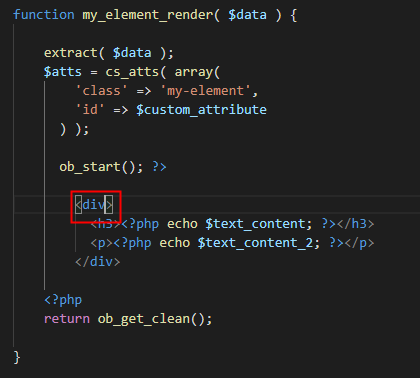
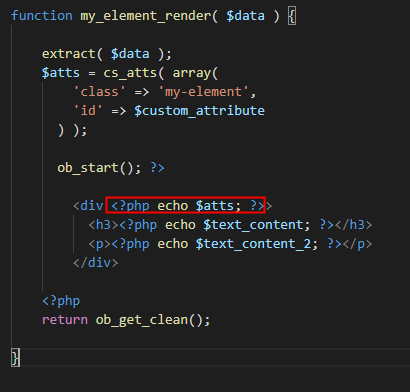
When I was testing a dummy element, I got the same issue too even there’s no error in my HTML. I eventually discovered that it had something to do with my PHP. For instance, not including the attributes to the output results in an error. Compare the first screenshot with the second screenshot.

With that said, please check all your PHP code if they’re correct also and can run without problems depending on your environment.

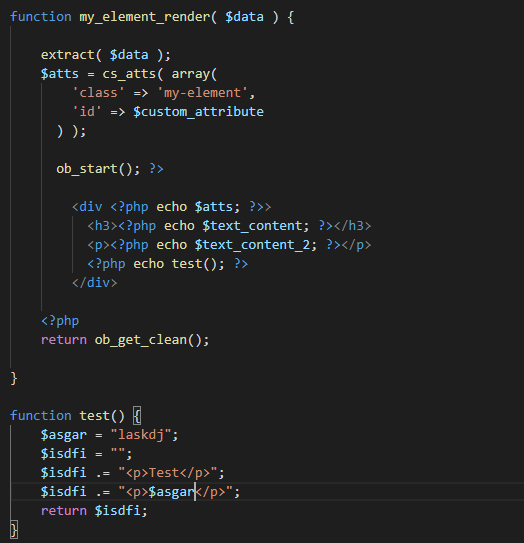
I’d also recommend simplifying your code like in my screenshot so you avoid escaping double quotes which are confusing.

Please note that we do not offer support for custom elements. It is expected that developers will fix their own code.

We are open to bug reports though so if you could dissect your code to small parts and detail how we could replicate, we’ll post it in our issue tracker so it will be queued for investigation by our development team.

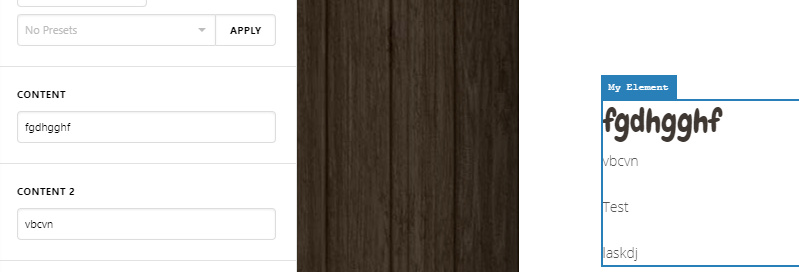
This HTML issue you described is not a bug though as I was able to output HTML.

Hope that provides some ideas and thank you for understanding.

@christian_y, thanks a lot for your help, the custom_attribute indeed did the trick! My elements are now working both as expected in the frontend and backend!

You’re welcome, @mediabachar. We’re glad that your custom element is now working.

This topic was automatically closed 10 days after the last reply. New replies are no longer allowed.