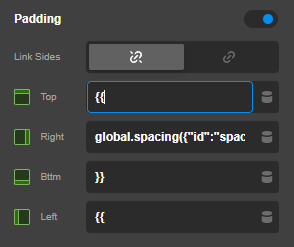
When inserting a Dynamic Content tag into a dimension field (padding, margin, gap, border-radius), the spaces inside the tag cause the value to split across multiple inputs (Top → Right → Bottom → Left).
Steps to reproduce:
-
Open any element in the Cornerstone builder
-
Go to a dimension field (e.g. Padding)
-
Unlink sides so you get individual inputs (Top, Right, Bottom, Left)
-
In any of the individual inputs, insert a DC tag — either via the DC picker or by typing manually
Expected behavior:
The full DC tag should stay in the single input field where it was inserted. For example, {{ global.spacing({“id”:“spacing-lg”}) }} should remain entirely in the “Top” field.
Actual behavior:
The space character inside the tag causes the input to jump to the next field. The tag gets split across multiple fields. For example:
-
Top: {{
-
Right: global.spacing({“id”:“spacing-lg”
-
Bottom: }}
-
Left: (empty or previous value)
This also happens when pressing the spacebar inside these fields — the cursor jumps to the next dimension input, suggesting the space key is being used as a field separator/tab.
Context:
In my case, I registered custom DC fields for design tokens (spacing, border-radius) under the Global group using cornerstone_dynamic_content_register_field(). The idea is to select a spacing token like “LG — 4em” from a dropdown and have it resolve to 4em at render time — very similar to how Global Colors and Fonts work.
This is where DC tags in dimension fields make the most sense, but the space-splitting behavior makes them unusable in these inputs. The issue also affects native DC tags (e.g. Global Color in a background or border field), so it’s not specific to custom fields.
Workaround:
I’m currently using CSS custom properties (e.g. var(–theme-spacing-lg)) instead of DC tags in dimension fields, since they contain no spaces. But you can still use custom CSS on your element.
Affects:
-
All DC tags (Global Color, Global Font, custom fields, etc.)
-
All dimension-type fields (padding, margin, gap, border-radius), shadow fields, etc.
-
Both linked and unlinked dimension modes
-
Breakout mode does not resolve the issue
Environment:
-
Pro theme version: 6.7.13
-
WordPress: 6.9.1
-
PHP: 8.4