Is this behaviour of the background possible

hi there,

i added 7 pictures in secure note and wanna ask if this behaviour is possible:

i have 3 sections. each section should have its own background.
when the user is on the site there is just the image. when he scrolls the page down, then there comes some content. if he scrolls more down, the content dissapears and the background from section one is still there until section 2 fades in. the same with section 2.

i tried it this way:

added a section with the specific background
added 3 rows.
in first row added a 100 vh gap
in the second row added the content
in the third row added a 100vh gap.

that worked but the image is VERY VERY BIG! that does not look good. is there a way to fix the image for the specific section to looks good?

many thanks in advance for your help!

cheers
Hi Harald,

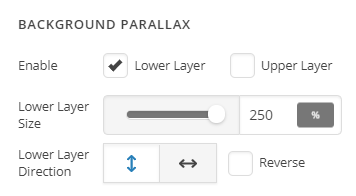
Thank you for reaching out to us. I believe you’re looking for the parallax background sections, here’s an example you can see http://demo.theme.co/ethos-2/

You can simply enable the parallax effect for your sections

Hope this helps!

Hi.

Thanks for your answer.

I tried that with the Parallax background already. As posted in my first post. The image is incredible big. So you don’t see anything from the image.
My question is: can the image stay fixed within the section when used a content to scroll? When you look at my pictures (all 7) and you scroll from 1-7 you see what I am trying to archive.

Section with fixed background not zoomed in.
A row with a 100vh gap so the user see’s the full picture
A second row with the content ( this row scrolls above the image from the section)
A third row with a 100vh gap so the user see’s the image again.

Then the same with the next section…

Sorry if I can’t describe it better, English is not my main language. I hope you can understand what I am trying to archive.

Thanks again for your help.

Cheers

Hi,

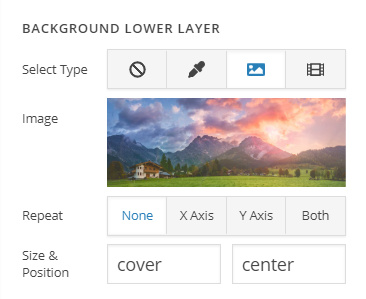
You can adjust the size and position of your parallax background image

Please try to do a trial and error on these fields.

You can set the size with the following values

For more information kindly refer to the link below

https://www.w3schools.com/cssref/css3_pr_background-size.asp

https://www.w3schools.com/cssref/playit.asp?filename=playcss_background-size&preval=auto

https://www.w3schools.com/cssref/pr_background-position.asp

Hope that helps

hi!

thanks for your answer. with the parallax effect it did some strange scrolling glitches.
i then made it with css and fixed the backgrounds. now the site scrolls smoothly…

one more question. no matter how i implemented the “fixed” background : with parallax or with css, there is a strange behaviour with the background image when scroling.
i attached a small video in secure note.
can that behaviour chnaged so the image will be pushed by the second image?

thanks in advance for your help.

cheers

Hello Harald,

Because the background is fixed, it is stuck with the browser height. If you remove the background fixed settings and set it to normal, the background image should scroll along with the page moving the image going up.

Could you please clarify which exactly you want to happen with the background image? I would recommend that you compare the normal background image, the parallax and the fixed background.

Please let us know how it goes.

hi ruenel.

sorry when i cant describe it 100% clear, english is not my main language…

what i try to archive is: for each section a fixed background, so i can scroll content over the background (that works now).
but when the user scrolls from section 1 to section 2, the background images should work like in the normal background, so the background image from section two pushes the background iamge from section 1 away instead of slicing/cutting the image.

the user scrolls in section 1 => background image is fixed.
the user scrolls down, section 2 appears on the bottom of the page. this section has also a fixed background. now the background should “press” the image from section 1 up. so it should work like normal backgrounds, image 2 pushes image 1 to top of the site…
what the site now doing is to cut/slice the backgound images like in the video above…

is it possible with css? remove the fixed backgroudn when scrolled to the end of section 1, and set the background fixed when section 2 is on top of the screen?

hope that helps? what i try to archive is also shown in the 7 pictures i added in the first post (you see in picture 3/4 what i mean with bg-image of section2 pushes the bg-image from section1 away)

thank you again for your help!

cheers

Hello Harald,

but when the user scrolls from section 1 to section 2, the background images should work like in the normal background, so the background image from section two pushes the background image from section 1 away instead of slicing/cutting the image.

  • The fixed background is not applicable to what you have in mind. You can only have parallax effect instead.

It would be nice see if you have any example url so that we can check it and see if it can be replicate or how can be replicated using Cornerstone or Pro editor. If ever you haven’t found any example url, then maybe that idea has not been or it is not possible to achieve at the moment.

Thank you for your understanding.

This topic was automatically closed 10 days after the last reply. New replies are no longer allowed.