hi, when you were sharing videos about the new update you share the new function about the eye dropper, being able to choose a color directly from the page we were working on, I want to know what happen with that feature, did it got delay? my second question is where can I find the presets from design cloud, I look everywhere and I don’t find them like the skew buttons, flat, etc? please don’t tell me that they are in their own pages or sections because they are not, before I was able to just add the button to my elements and use it, what can I do now
Eye dropper only works if your site is on HTTPS unfortunately, which is a browser limitation. It usually only shows up for me too when using Chrome. You’ll see it on the playground if your browser has it at all https://playground.theme.co/
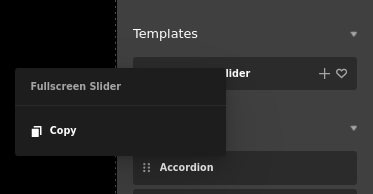
Do you see your presets in the “Manage Library” area or element library? The actual Preset controls are coming back in Pro 6.3. Currently you can copy via right click in the element library to then paste onto another element.
oh ok, Thank you for that.
I do not see them in the “manage library” area, do you know how long will it take for pro 6.3 to arrive, thank you!
Hey Juan,
We cannot give ETA for the release of Pro 6.3, please stay tuned.
Thank you.
I saw you said that from the Element Library you can right click the imported template / preset and paste it onto the element you want it on in the page however when I right click the template / preset element from my Library that I imported, it only gives me the right click options of my computer for example, save image as, open image in new window etc. I am having the same problem with applying a preset to an element.
@jesusvive053 Aiming to start Beta for 6.3 in Mid May.
@Eliasferreres You don’t see this context menu? Just checking your in the right spot, if not do you want to download that preset .tco file and send it our way?
This topic was automatically closed 10 days after the last reply. New replies are no longer allowed.