Is Pro compatible with WPML?

Hi. First time using WPML - I added a French option to begin with and I now have two issues.

  1. I clicked + (add Translation) to the About Us page from wp_admin > pages. This page now does not appear in the Pro Builder (see about1 and about2) when the French language is selected.

  2. I attempted to translate the Testimonials page from within Pro, but when I clicked ‘Start Blank’ it created the French variation of the page, but crashed the builder (see error screenshot). This page does appear to have begun the translation process (see french and french2)

Can you let me know what the issue might be?

WordPress 5.2.3 running Pro – Child Theme theme.
There are two Pro parent themes (2.16 and 2.55)

Thanks

Hi @doughballs,

Thanks for reaching out.

As for your first question, yes, Pro is compatible with WPML. There are known issues but should be fixed in next update releases.

  1. When you add a page while the English language is active, it will only be displayed on the list when English is active. That’s why About page will not appear on French listing. You should switch to English first and edit the About page then translate it there to French. That’s when the French page version of About page will be displayed. As of now, it has no translation that’s why it’s not yet listed from the French version.

The same rule applies if you happen to switch French in Wordpress admin and added a page, the page will be listed on French listing but not on English listing. This is WPML limitation and not by the builder since you have to create the translations.

  1. It doesn’t seems
    to be related to builder or WPML, it could be rewrite-related issue since the URL being requested return 404 (not found or non-existing). Would you mind providing your staging’s admin login credentials in the secure note for further checking? And for the meantime, please check this https://theme.co/apex/forum/t/wpml-issue/48740/3 and make sure the same WPML settings are applied.

Thanks!

Hey. Sure, log in details provided in secure note. Please note this is a live staging area with changes ready to be pushed live so let me know if you change anything.

In response to your answer - I haven’t added any new pages, all the pages already existed. It was when I added a translation to a page in wp admin that the page then disappeared from Pro > Content, even thouhg I haven’t provided a translation and even though I then deleted the request for translation in WPML!

Maybe I just need to figure the journey out. I assumed I would choose French, and then be presented with the same fields as the english version, where I just amend to French? As the page won’t load, I can’t actually see the process.

I checked out the link and made the changes you recommended (apart from the manual translation as this option is not available to me) and it didn’t help unfortunately. If I choose french before clicking edit in pro > content, then I get the page error as before, and if I click edit on the english version, then choose french, it loads up a blank empty template.

Hi @doughballs,

Do you mean the About is the existing page before the builder or WPML is installed? Old or new, you would still need to create translations for them. I checked the About and it still has no translation, and you can confirm that since there is a + icon and there is a text “Add translation to French” when hovered.
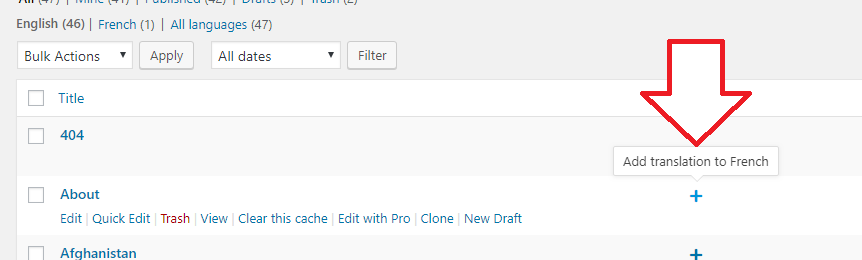
This is the reason why there is no About page when you switch to French (Question #1, (see about1 and about2)). Hence it’s not an issue, it’s just that there is no translations for old or newly added page. They did not disappear, you haven’t yet provided a translation so there is nothing to list on French listing.

You can click the + icon and it will create a page as a translation of your About page. Then you can just edit the created page within the builder. That’s another way of translating it other than creating it within the builder. But that means it will always start empty within the builder.

By the way, request for translation in WPML! will not work, you’ll have to create your own translation since the content is coming from the builder.

And yes, you could choose French once you’re within the builder then instead of starting from blank, you could start with the existing page (Copy Existing) which will give you same set of fields or contents, then you can just ammend the content for translation. That’s actually how it should be translated instead of clicking the + icon.

Then about the error from the builder, there is an internal server error. I’m trying to disable the WP Rocket plugin but it just activates back. Could you try disabling all other plugins not related to this issue? Then let’s check the builder again, this error is not related to WPML nor the builder but they get affected.

Thanks!

Hey. Thanks for your detailed response!

Ok, so I tried your method on the terms and conditions page and it did not work. I clicked edit while english was selected, and I got the option to copy existing. I clicked this, and the builder crashed with the same error. It has created a blank page again.

I forced disabled WP Rocket and tried again on the financial protection page, and again the builder crashed, so this is not a fault of WP Rocket.

I now have the issue of pages that have been supposedly copied over are blank, and they cannot be accessed via the content menu (about page) when the french flag is selected.

I changed some settings in WPML to include manual translation and it seems to have worked…but I still can’t access the pages I already attempted to translate. Any ideas on how to reset/delete the french failed attempts of these?

Hi @doughballs,

Can you try a complete plugin test? Please try disabling, all other plugins except those that needed for testing the builder and then check again. If you have caching on server, please try to clear cache before checking again.

Go to page list, select FRENCH, delete the french terms and condition page. Note to always save a backup of your database.

Hi. I’ve deleted all French translations, see screenshot:

And the problem persists - these pages cannot be created from the builder, and they don’t appear if you click the french flag (every page apart from the ones that had previous translation attempts appear).

Apparently WPML officially support X but not Pro…is this the problem?

Hi @doughballs,

It should be deleted permanently. It is still on trash so I deleted Terms and condition french translations permanently. Yes, I can see the issue is still there, there’s something on the settings I can’t find that is preventing the translate. As an alternative, I went ahead and CHOOSE BLANK instead when translating Terms and Condition page to french. Then, I save the content of the english page as template. I loaded this template then on the french page. Please check now, when you switch to french, it is loading and there is content. Same with the english page.

Hope this helps.

Hi. Thanks - the problem with this method is the T&C page is very simple and recreating it is easy, but the other pages are very complex and recreating each page each time from a template is too time consuming. 4 languages to translate so x 4 recreations of each page. I need to find a better method really.

Hi @doughballs,

The purpose of disabling any cache plugin or feature is to make sure it doesn’t hindrance the troubleshooting. The cache is the opposite of change, and any change we apply will not immediately available for testing.

Unfortunately, there is no other way since it should be translated that way if you prefer to use cornerstone to edit them. Any translation made outside the builder will break the page content. It’s the only method available between WPML and Pro/Cornerstone builder.

String translation is just replacing strings, whereas builder translation needed the complete structure of the builder while editing the strings. Hence, if you only use string translation outside the builder, it will then overwrite the existing structures which makes builder fail to load it.

Example, the <div class="hi_there>Hi there</div> may result to Hi there only.

Thanks!

This topic was automatically closed 10 days after the last reply. New replies are no longer allowed.