Hello!
I got this error when I try to activate the toggle fullscreen option in slider revolution, there is an interposition of contents! see image.

Thanks!
Hello!
I got this error when I try to activate the toggle fullscreen option in slider revolution, there is an interposition of contents! see image.
Thanks!
Hi Andres,
Thanks for reaching out.
The slider is already set to ** full-screen**, the black background of the slider is the part of the specific slide. Please find the screenshot describing the settings.
If that is not the case and you are trying to point out something else, please provide a screenshot marked with the issue or any video that helps us to recognize the problem.
Thanks
Hi! thank you for your response, however, this is the problem ( fig 1) regular view, (3 columns) the middle one is the slider revolution module, in the (fig2) there is a full-screen action when you click over the image, this is the mentioned error, the main menu and the 3rd column keep on the image.
Hello There,
I have inspected your test page and I could not replicate any issues. When I click on the slide image, the slider becomes fullscreen which it is intended to be. Please clear your plugin caches (WP Rocket), browser cache and/or use private browsing mode before testing your site again.
Regards.
Thank you for your quick response, I really did, I´ve used all the browsers and I can replicate the issue, please check the second image, the slider becomes fullscreen however the main menu (top) and the third column (right) keep visible. The full-screen action must hide all the page contents.
Hello Andres,
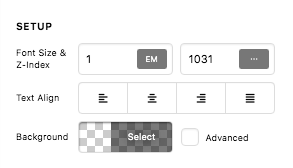
Now that you have sent me the URL of the page, I figure out the cause of your issue. You simply need to change the z-index of the section and the column where you have inserted the slider.
For the section:
For the middle column:
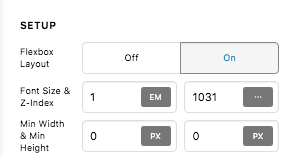
So I went ahead and made the changes already. Kindly check your page now.
Thank you for your valuable help!! that works like a charm in every browser however on safari I got this:
Hello Andres,
On a big screen, I am seeing this:
Please edit your page again and set a minimum height in the column settings. It should be 100vh so that the slider will also display in fullscreen.
Hope this helps. kindly let us know how it goes.
This topic was automatically closed 10 days after the last reply. New replies are no longer allowed.


