I would like to insert this shortcode [responsive_youtube hv4HIrDtjZo norel]. For a YouTube Video on the home page. However, I would like it to go edge to edge of the screen. What is the best way to do this. https://lincolnveteransparade.org/
Hello @rkassebaum,
Thank you for the very detailed post information.
To accomplish what you have in mind, you will need to insert a section and row with one column. In your row settings, you will need to disable the “Inner Container” option. You may insert a content area element and insert your youtube shortcode from there.
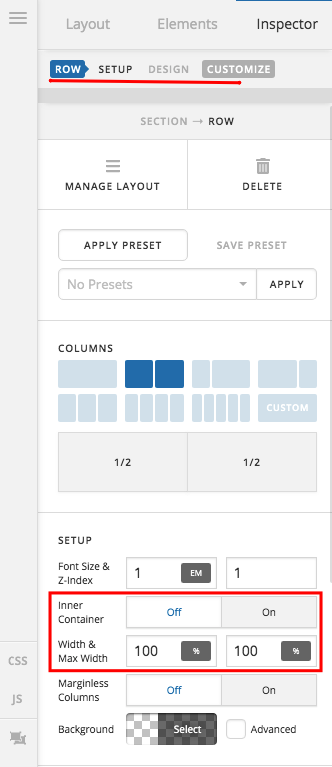
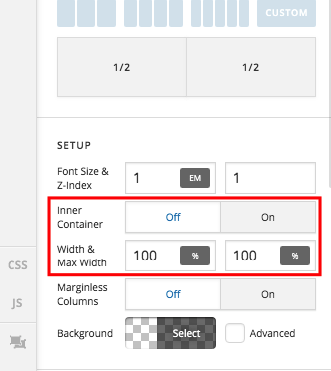
Hope this helps. Please let us know how it goes.
Can you check out this page. https://lincolnveteransparade.org/sample-page/. For some reason the video doesn’t go clear over to the right. It does go all the way left. Any suggestions?
I noticed the video does keep up to the right if you move your window wider.
Hello @rkassebaum,
I am not sure how your shortcode “[responsive_youtube hv4HIrDtjZo norel]” works. It may not display a fullwidth video. So I would highly recommend that instead of using the Content Area element, use the video element and insert the embed code:
<iframe width="100%" height="auto" src="https://www.youtube.com/embed/hv4HIrDtjZo" frameborder="0" allow="accelerometer; autoplay; encrypted-media; gyroscope; picture-in-picture" allowfullscreen></iframe>
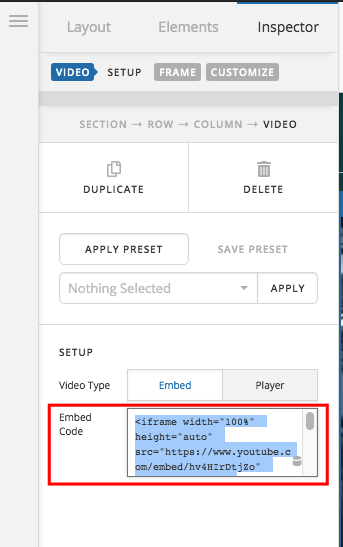
Hope this helps.
This topic was automatically closed 10 days after the last reply. New replies are no longer allowed.