Hi,
I’m new with this theme and for css and html
Can you show me how to insert a picture in the top bar ?
Also the logo of my home page is on left side. how can I change to center ?
my website is http://belzonaquebec.com/
thanks
Hi Jean,
Topbar accept html so we can add an actual image tag. Go to Theme Options > Topbar Content then add the actual image:
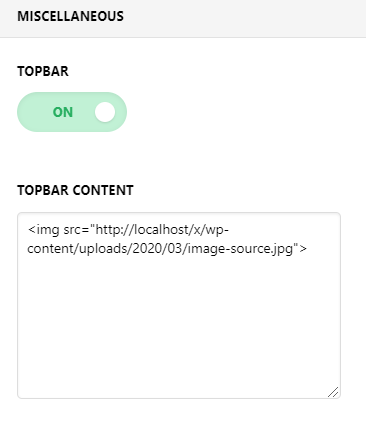
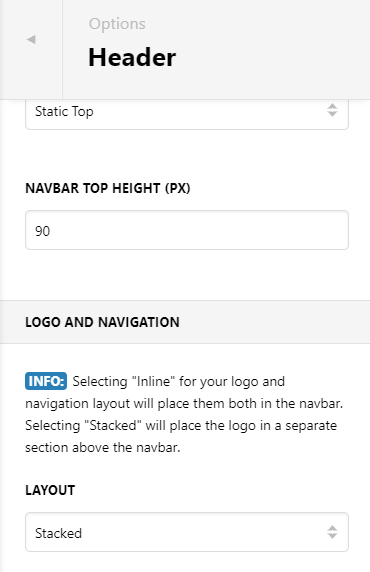
On Header > Logo and Navigation > Layout : Choose Stack
Hope this helps.
thanks, it working
I removed my logo header. is it possible to remove the small grey border ?
Also possible to reduce the width of the top bar ?
the website http://belzonaquebec.com/
thanks
Hi Jean,
To achieve that you need to add some custom css.
First the grey border, you can add a css that removes that area. Try this.
.x-logobar {
    display: none;
}
To reduce the width of the top bar you need to update the width using css. Try this.
.x-topbar-inner.x-container {
    width: 500px;
}
Hope it helps.
thanks
for the grey border, it works.
for the top bar, I made a mistake. it was for the height.
I put this code but no change
.x-topbar-inner.x-container {
height: 50px;
}
another solution ?
thanks
Hello Jean,
You may try to get rid of the top and bottom margins of the h6 and paragraph tags through CSS to lessen the height of your topbar. Please try this code:
.x-topbar p, .x-topbar h6 {
    margin: 0;
}
Kindly note that since this is a custom code that changes the default behavior/display of the theme, you will be responsible to maintain or update the code in case you require further changes or if the code stops working in future updates. If you are uncertain how to proceed, it would be best to get in touch with a developer.
Hope this helps.
thanks, it work
Just one more thing about the top bar
My text is uppercase. I want it normal
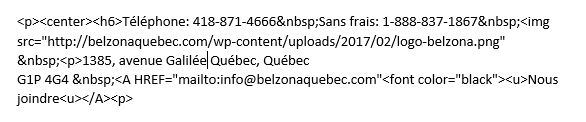
this is my code in the top bar section
thanks
Hi Jean,
Unfortunately, you added none standard assorted code there which is not possible to track how it is added, it is a mixture of tags such as center which is deprecated and h6 tag and deprecated u tag. We are unable to give fixing code for your custom code added to our theme and you are responsible for the code that you add to the top bar option.
I suggest that you take some time and learn more about the current HTML valid code so that you can be more efficient on your website building as it is an essential part. The HTML code should be only for presenting data, all the styling should be done via CSS code.
Please kindly click here to learn more about HTML coding and here to learn more about CSS and how to select correct tags to style them.
You also can make use of the Google Chrome browser developer toolbar to easily find proper selectors for CSS. Kindly click here for more information.
Finally, the CSS code that causes a text to be uppercase or lowercase is called text-transform. You can start your research on how to incorporate that code here.
We are always doing our best to help our customers, and if the request is related to our product options themselves we would be more than happy to follow up and help. Handling a code that is added by the customer is on the customer’s shoulders.
Thank you for your understanding.
Thanks,
I will check those
You’re welcome.
This topic was automatically closed 10 days after the last reply. New replies are no longer allowed.