Inline menu - no color change on front side

Hi,
Sorry for all the questions. But I encounter a problem with an one-page menu.
Creating this menu - inline menu - on the ‘back’ side I have the text color black, and change to orange when interacting with it. This works well on the back-side.
Looking on the front side, the menu text stays orange (both on normal stage as in the roll-over stage)

Does it have something to do with how I set up the links on this website (orange / black - normal / roll-over)?
How can I create the header-menu as I would like to have it: Normal state: black - Ineteraction state: orange.

And a second question about this one-page menu: I think I need to create a separate menu for small screens - as navigation collapsed. Is that correct?

Thank you in advance.
I send you the inlog separately.
Liesbeth
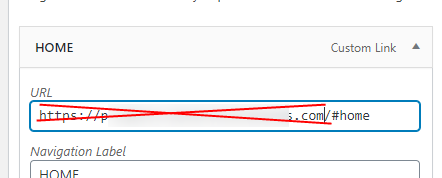
Hey @lvandeemter,

The first issue has to do with full URLs. You need to use the hash and the section ID only like #home. I did that to your home menu and it works. Please edit the rest.

I understand that you won’t be able to use the Header globally so for this case, you will need to create another menu with Full URLs then duplicate your current header and then use the new menu with full URLs.

-----------------------------------------------------------------------------------

For the 2nd question, yes, you’ll need to use the Navigation Collapsed element.

Hope that helps.

Thanks so much again for you quick and good help! :thumbsup:

You’re always welcome @lvandeemter!

Cheers.

This topic was automatically closed 10 days after the last reply. New replies are no longer allowed.
