Inline Menu Dropdown Z-Index

Hi there. Please help me to find out.

I want my Dropdown to be layin UNDER header, not OVER.
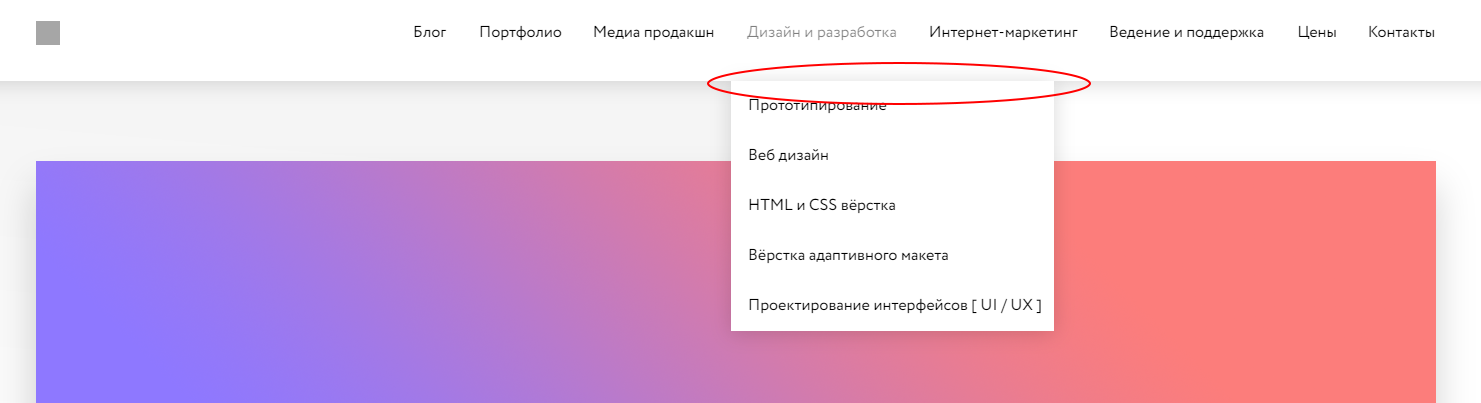
As you can see, th shadow of dropdown is layin OVER main header. But the problem is not in the shadow. I just trying to add some animation to dropdown:

.x-dropdown {
  visibility: hidden;
  transform-origin: center -15px 0px;
  transform: matrix3d(1, 0, 0, 0, 0, 0, -1, 0.00125, 0, 1, 0, 0, 0, 0, 1, 0.99875);
  opacity: 1;
  transition: all cubic-bezier(0,0,0.3,1) .2s;
}

.x-dropdown .x-active {
  visibility: visible;
    transform-origin: center -15px 0px;
    transform: matrix3d(1, 0, 0, 0, 0, 0, -1, 0.00125, 0, 1, 0, 0, 0, 0, 1, 0.99875);
  transition: all cubic-bezier(0,0,0.3,1) .2s;
}

Then i’m adding this code i see animation coming throught the main header.
Hey Philipp,

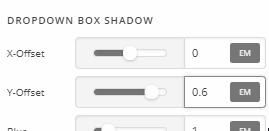
There’s no z-index option for the Navigation Inline’s Dropdown. Though it’s not a dropdown issue like you said, the solution here would be to increase the Y-Offset value of the Dropdown Box Shadow until the top shadow is no longer visibile.

In case you want the z-index solution, that would require custom development because the dropdown’s z-index in the Stack CSS is set to 9999 and our development team has a reason why it’s set that way. Tweaking it would be the user’s responsibility to implement and maintain. I also just tried tweaking and it’s tricky. Though I might be able to achieve a z-index solution, that will take some time and it’s outside the scope of our support. Please see our Terms.

Hope that helps and thank you for understanding.

1 Like

This topic was automatically closed 10 days after the last reply. New replies are no longer allowed.