hi,
in any stack, when I put the header inline, the subsubmenu open to the left.
Is it normal ?
thanks
Hello Jean,
Thanks for posting in!
Are you referring to this position?
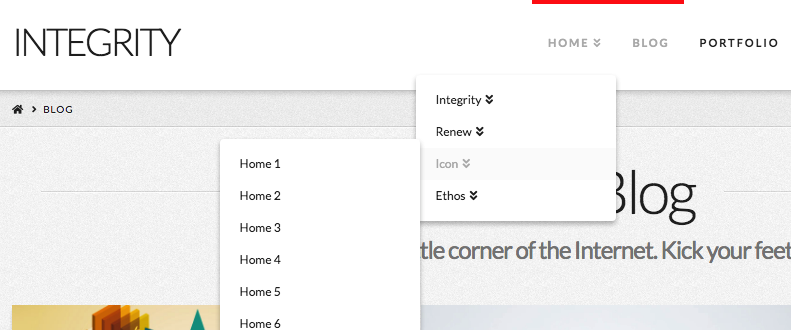
This is the default position of the submenus because when it is position to the right, the submenus will no longer visible especially if the submenus will be in the last menu item.
Hope this helps.
hi,
possible to change the position ?
thanks
Hello Jean,
If you want to change the position, you need to add CSS code into X > Theme Options > CSS. You need to use the Google Chrome Developer Toolbar to check the live HTML code and find which CSS selector you need to use.
The submenus of the theme has .sub-menu class, therefore a proper CSS selector for the submenus in the navigation will be:
.masthead-inline .x-navbar .desktop .sub-menu {
    left: auto;
    right: 0;
}

.masthead-inline .x-navbar .desktop .sub-menu .sub-menu {
    right: 98%;
}
We are unable to provide CSS code for the customization as it is outside of our support scope. The points above will be a good starting point for your customization. Simply switch the values of the left and right properties, you should be able to reposition the submenus.
If you are interested you can learn more about CSS selectors and details here
thank you and have a nice day
You’re always welcome Jean!
Cheers.
This topic was automatically closed 10 days after the last reply. New replies are no longer allowed.