Inline buttons on buttons

Hi X,

Im working on this page: https://www.brasseriebos.nl/performers/

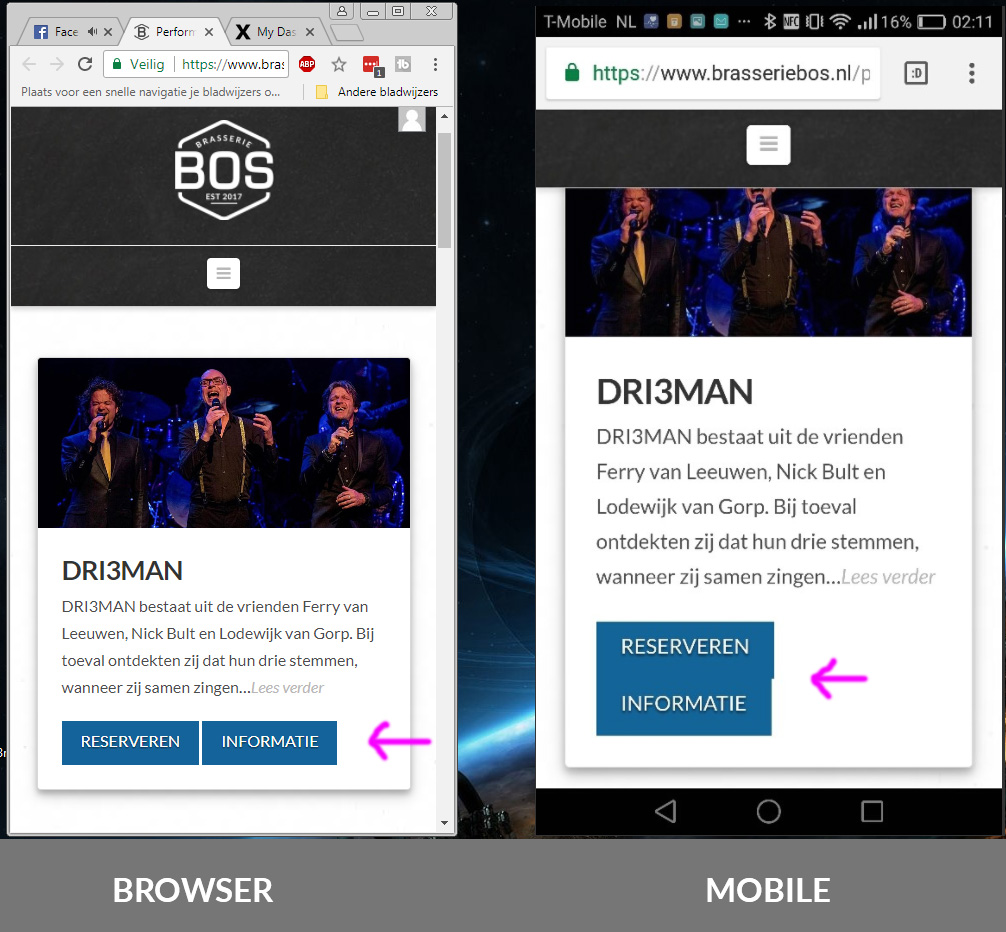
I was wondering how to get the buttons on the same line with a little bit of space between them for the mobile display.
I’ve created a image in PS in photoshop (check out link below).

On Google Chrome Desktop you will see how i like it to look like (left image). On the right image you see the current view on mobile.They are on top of eachother, thats not good. I would like the mobile display to look the same as the browser.
Please advice.

Kind regards,
Jeffrey

Hey Jeffrey,

There are 3 options for this.

  1. Use a smaller sized button.

  2. Use Responsive Text feature for your buttons. See https://youtu.be/DdjVRG1BR1w. You have to play around with the compression and the min and max font sizes to get it right for your design.

  3. Use custom media queries. We have an in-house custom development team that offer paid services, who may be able to assist. They can be contacted at [email protected] if this is of interest to you.

Thanks.

Hi Christian,

Thank you for you reply. I will try option number 2 soon :smiley:

Kind regards,
Jeffrey

You’re welcome! :slight_smile:

This topic was automatically closed 10 days after the last reply. New replies are no longer allowed.