Hi folks,
I think in previous releases I could inline buttons side by side in the same columns, but for some reason with the latest release PRO I’m unable to figure out. Any ideas?

[edit] Found it! Flexbox is breaking them apart.
Hi folks,
I think in previous releases I could inline buttons side by side in the same columns, but for some reason with the latest release PRO I’m unable to figure out. Any ideas?
[edit] Found it! Flexbox is breaking them apart.
Hi @rafalkukla,
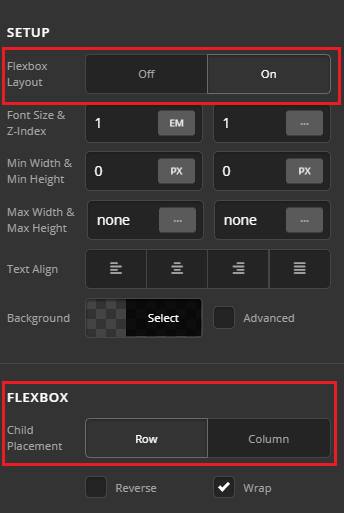
Thank you for reaching out to us. If the Flexbox Layout is turned on for the columns then under Flexbox > Child Placement select Row to display the items inline (see screenshot)
To learn more about Flexbox please see https://css-tricks.com/snippets/css/a-guide-to-flexbox/
Hope this helps!
Hi Nabeel,
I tried that and button looked like it was stretched apart, and the button underneath was still there. So by adjusting flexbox child placement to row made no difference, unless it’s a bug?
I turned off flexbox and got the design and buttons the way I need it.
Glad it’s working now, cheers! And thanks for sharing!
This topic was automatically closed 10 days after the last reply. New replies are no longer allowed.