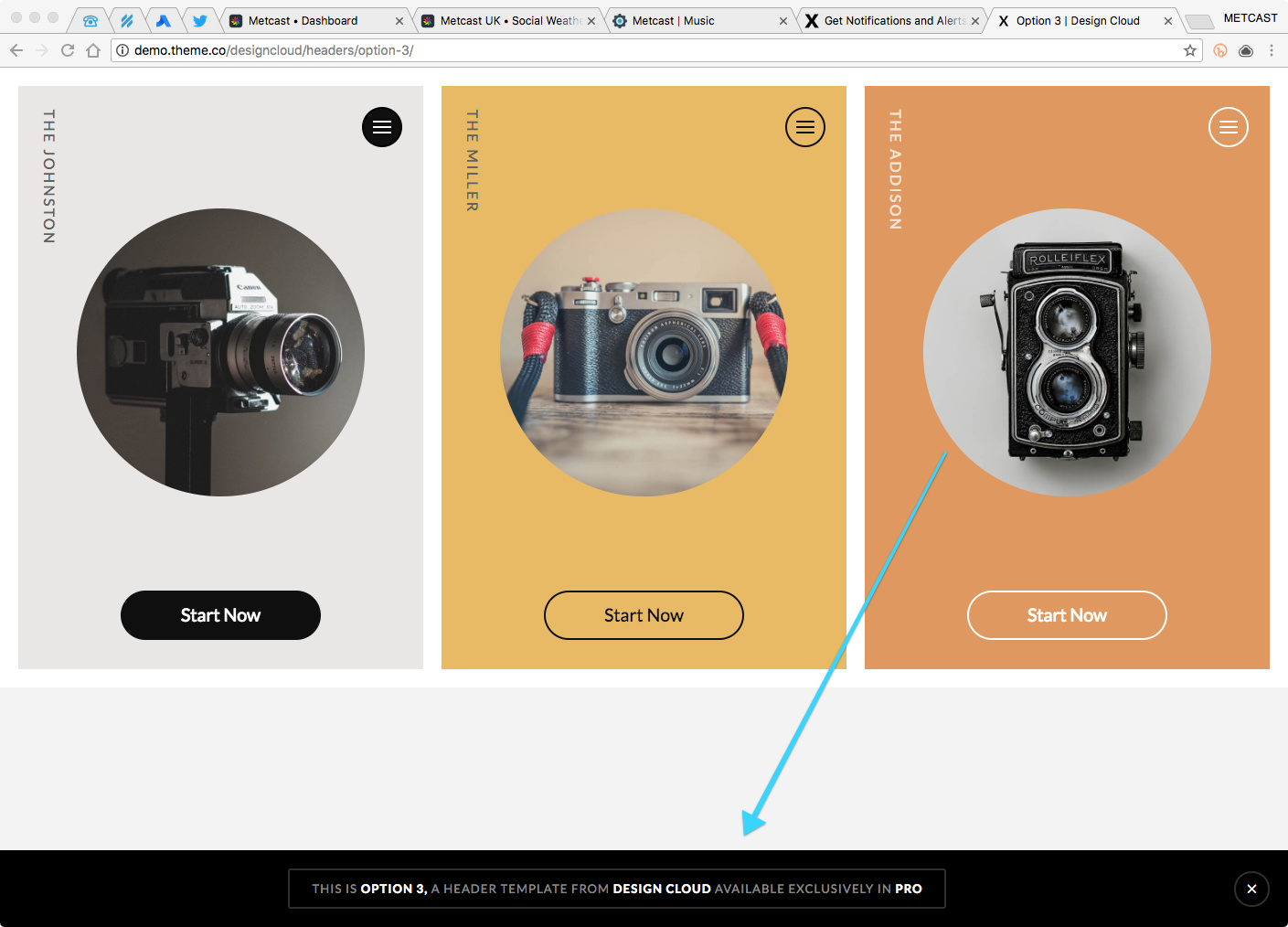
I’d like to have something like this: https://cl.ly/sHeX - How did you build it?
Hello There,
Thanks for writing in! It seems that you have submitted an invalid url. I think it no longer exist.

Please double check and give us the link again.
Nope the link works for me. Here’s I’ve pasted it into this post for you.
Hi,
Thanks for writing in!
That is a custom made html designed for labeling our demos.
Sample code is
HTML
   <div class="tco-dc-message">
      <h1>
        <span>This is <a href="http://demo.theme.co/designcloud/headers/option-3/">Option 3,</a> a Header Template from <a href="//theme.co/designcloud/">Design Cloud</a> available exclusively in <a href="//theme.co/pro/">Pro</a></span>
      </h1>
      <button>✕</button>
    </div>
CSS
 .tco-dc-message {
        display: -webkit-flex;
        display: flex;
        -webkit-flex-flow: row nowrap;
                flex-flow: row nowrap;
        -webkit-justify-content: center;
                justify-content: center;
        -webkit-align-items: center;
                align-items: center;
        position: fixed;
        z-index: 999999999;
        left: 0;
        right: 0;
        bottom: 0;
        padding: 20px;
        background-color: #000000;
      }

      .tco-dc-message h1 {
        margin: 0 auto;
        border: 2px solid #2f2f2f;
        border-radius: 3px;
        padding: 10px calc(25px - 0.085em) 10px 25px;
        font-size: 13px;
        font-weight: 400;
        letter-spacing: 0.085em;
        line-height: 1.6;
        text-align: center;
        text-transform: uppercase;
        color: #888888;
      }

      .tco-dc-message h1 a,
      .tco-dc-message h1 strong {
        font-weight: 700;
        color: #ffffff;
      }

      .tco-dc-message h1 a {
        text-decoration: none;
      }

      .tco-dc-message h1 a:hover,
      .tco-dc-message h1 a:focus {
        outline: 0;
        text-decoration: underline;
      }

      .tco-dc-message button {
        -webkit-flex: 0 0 auto;
                flex: 0 0 auto;
        width: 3em;
        height: 3em;
        margin: 0 0 0 20px;
        border: 2px solid #2f2f2f;
        border-radius: 100em;
        padding: 0;
        font-size: 13px;
        color: #ffffff;
        background-color: transparent;
        transition: border-color 0.2s ease;
      }

      .tco-dc-message button:hover,
      .tco-dc-message button:focus {
        outline: 0;
        border-color: #888888;
      }
Thanks
1 Like
This topic was automatically closed 10 days after the last reply. New replies are no longer allowed.