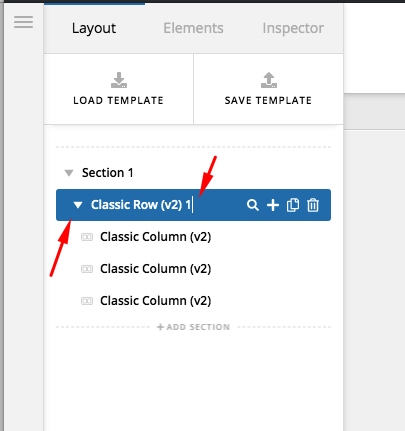
The new left sidebar raises many UX issues of concern. One in particular is what happens when clicking rows. When I click on a row (not the menu indicator), it expands. Even if I don’t want it to and I just want to adjust row properties, it expands revealing all of the elements of the row. OK fine, so then if I click it again, it should collapse…
It does not. Why not? If it’s going to expand on click w/o me asking, shouldn’t it at least do the opposite if I click again? If not, can we NOT have it expand on click then (or only expand when the menu indicator to the left is clicked)? Because you’ve created a UX issue by making the process of moving rows way harder in the left sidebar than it used to be. This is exacerbated by the rows having to be collapsed to move them properly. See how all this adds up to wasted time?