Hi again, I’d like to import the posts of another WordPress Website and would like to know how to do it so that the posts have a certain layout, or at least so that I can work on them in cornerstone. Can you give me some advise?
Hi there,
If you are migrating some blog posts from an existing site to a site using X theme, chances are that there might be some changes in the layout as different themes have different CSS codes in styling and setting the layout. Also, if the current posts on the site are using the text mode, you will have to redo the pages in Cornerstone because Cornerstone pages will overwrite the current code you have if it’s initially in Text mode.
Hope this helps.
Thanks! Yes, the old ones where done in text mode. All the ones on the new site I built with X are done with Cornerstone…
So I understand it is possible to change the layout of imported posts in cornerstone without deleting the content?
Is there a way to set all the imported posts to Draftmode, so I can work on them before they are visible?
Hello @blueprint,
Thanks for updating thread. 
I am sorry but you will have to create the post again in Cornerstone. As of now you can’t change the layout without deleting the content. The moment you edit and save the page in Cornerstone it will override the existing content and styles with the ones generated by Cornerstone. In that regards you will have recreate the content using Cornerstone.
As for the draft mode, you can click on save draft button under publish section of WordPress editor and then continue to edit the post/page in Cornerstone. Here is the screencast and screenshot that you can refer to save the post/page as draft. https://screencast.com/t/pgYY03O74
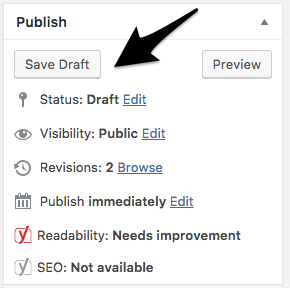
Thanks.
Thank you for that info!
Meanwhile I tried the following:
I copied the Post from the text-mode of the old Blog and pasted it ito the text-mode of my new Blog, made with X. I did not use Cornerstone on that. Looking at the preview I’d say it works quite all right. Only the Algnment of the Headline / Post title is wrong.
My questions:
#1 If I import the old Posts would it look the same as in this test?
#2 If so, I would only need a fix for the title alginment, that won’t mess up the posts Ialready created in cornerstone. Is there some code for that?
I’ll send you the url
Hello There,
Thanks for updating in!
1.) Copying and pasting the post contents would work as always. There should not be a problem with this method. It will just be difficult if you have hundreds of posts. If you have less than 20 posts, then you should do fine.
2.) The post title alignment has nothing to do with how you imported the post. This issue happened because of your custom css. You have added this:
/*Posttitel*/
.entry-title {
	text-align: left;
  font-weight: 600;
  margin-bottom: -1.7em;
  font-size: 270%;
}
Please change the negative margin to zero.
1.) My question was a little different. I’ll try again: Copying and pasting was just to check how the post would look like if not created with Cornerstone. My question is: If I import the posts (above 200 by the way) will they have the same appearance as the pasted one, or will they look different. If so how could I see what they would look like.
- removing the
margin-bottomsolved it. But is there a code that apllies margin-bottom: -1.7em;` only if a h4 follows?
Hi There,
- Sorry but I am not entirely certain of this issue, what do you mean by “h4 follows” is it a child element or a sibling element? Please provide us a direct link to a sample post so we can take a look.
If it is a child element then you need to update the CSS selector to this .entry-title h4
If it is a sibling element then your selector would be .entry-title + h4
- Does all your old post looks like your TEST POST, (a.k.a. plain text?), if so then yes, Importing it will work. But you won’t able to edit those posts in Cornerstone because they don’t have the serialized data that the Cornerstone needed to read those posts.
And like Jade said above, different themes have different styling and markup. So whether you paste or import the posts there will be styling that you’ll need to adjust.
If your posts contain complex layout and styling, then importing it might be more laborious than rebuilding all the posts in Cornerstone.
Hope this shed some lights,
Cheers!
Thank you for your detailed reply!
-
Mainly the old posts are text posts. Some have pictures attatched, but as I recall it is possible to export posts without images, right?
I’m still not sure if it makes a difference if I copy and paste posts or import them. Does the import come with the presets of the old theme? With copy and paste I did not see that there were. -
The .entry-title h4 and .entry-title + h4 did not do what I intended. On the right side of the attached skreenshot you see the desired aoutcome (done in cornerstone). On the left side you see the pasted post (without any further customisation)… I Ithink I need a code that alignes the Title to the left. and makes post content begin right after the post title, - without an empty space. That way the cornerstone posts do not change their look and imported ones get close to is. Is that possible?
Thanks!!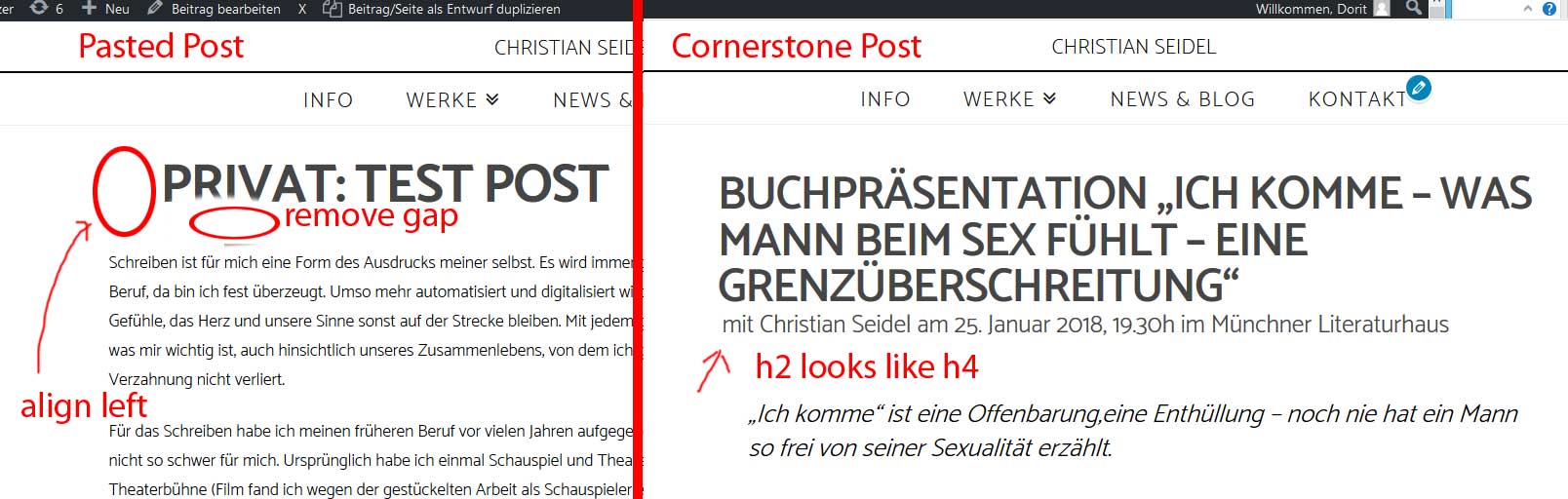
Hi there,
-
If the attachment is the featured image and you import the content without attachment, then it should only import the text. But if the content has static image URL, then it will display the text with dead images. About the look, I’m not sure if they will look the same, but the content should be the same minus the image if there is any.
-
That’s actually an h4 element and not h2, you should choose h2 in your custom headlines setting. As for the gap, you have to remove this existing CSS.
.single-post .entry-header .entry-title, .single-video_beitrag .entry-header .entry-title {
    width: 89% !important;
    padding: 0;
    max-width: 1200px;
}
then add this CSS,
.entry-title {
    width: 100%;
    padding: 0px;
    margin-bottom: initial;
}
Thanks!
Thank you! Sorry to be a nag, but the new code sets the post tiles of the Corenerstone Posts outside of the column.(see skreenshot).Maybe I could give the 15 Cornerstone Posts an Id so that the width will only effect the imported Posts?
And I still need a fix for the gap between post title and content. I’d like it to look like in the next skreenshot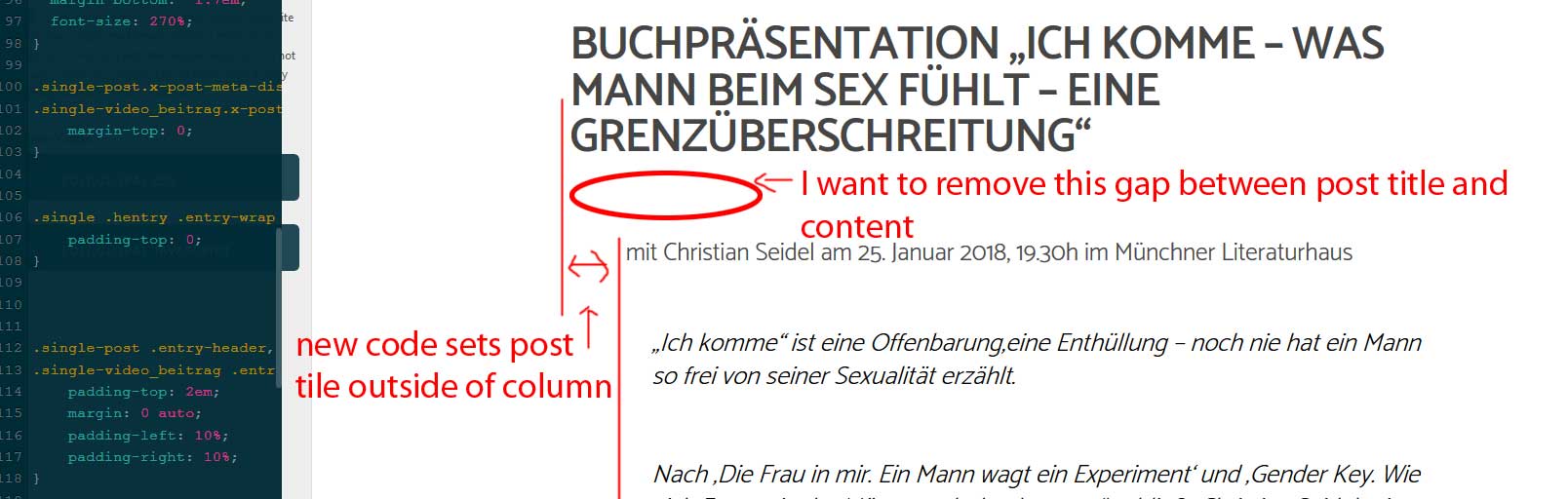
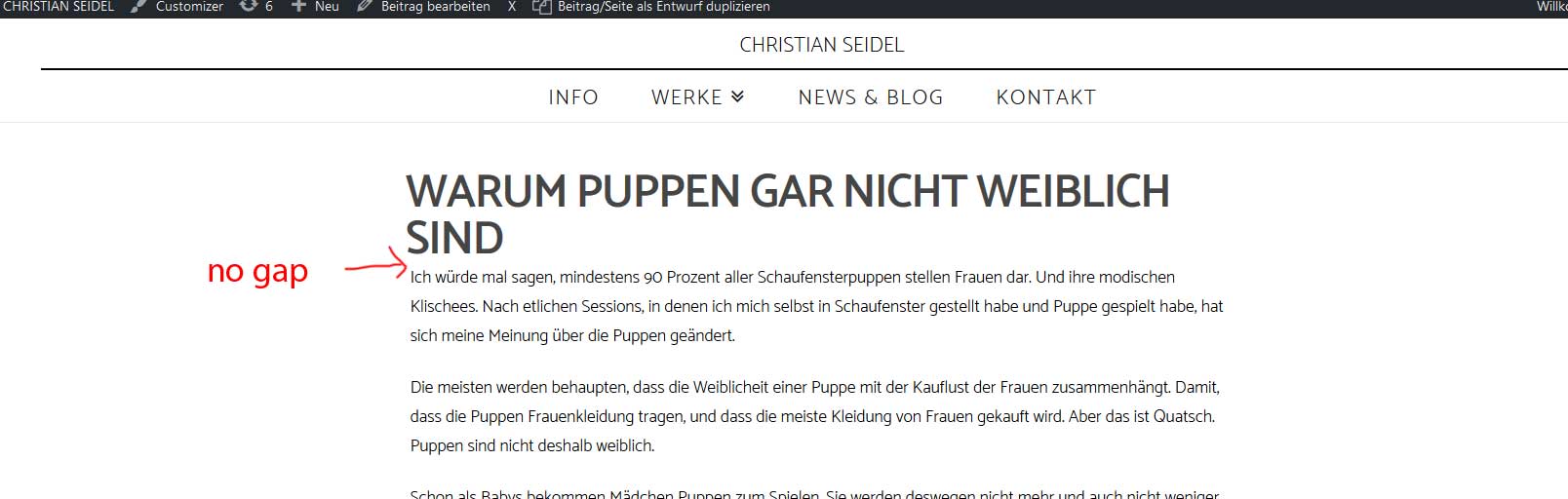
Hi there,
Please add this code in the custom CSS as well:
.single-post .entry-wrap {
    padding-left: 0;
    padding-right: 0;
}
Hope this helps.
I removed this code as you said:
    .single-post .entry-header .entry-title, .single-video_beitrag .entry-header .entry-title {
        width: 89% !important;
        padding: 0;
        max-width: 1200px;
    }
and added these two instead:
   .entry-title {
        width: 100%;
        padding: 0px;
        margin-bottom: initial;
    }

    .single-post .entry-wrap {
        padding-left: 0;
        padding-right: 0;
    }
Sorry that did not fix it (see skreeshot) .
.
I’m sorry that it is so complicated - I’ll try to explainagain what I need:
I have 2 different kinds of posts - 15 that I created with cornerstone and soon above 200 imported posts from another site.
I need a code that
1st removes tha gap between title and content (none of the codes did that yet, neither to the Cornerstoneposts nor the pastet one)
And 2nd code would align the Post title of the Cornerstone posts with the column
3rd code tat aligns the tittle of the impored posts (wich have slightly differen columns or alignment) with the content.
I hope this made it clearer :
Thank you!
Hello There,
Things got complicated more and more. If I were to resolve this, I will have to remove your custom css for the title. You added the custom css because you thought that post created in cornerstone does not have the same alignment as the default posts. Since the default post will be imported and there are 200 posts, I would suggest that you simply edit your post created with Cornerstone and have the section paddings and column container in the row settings disabled.
First thing, we need to make it look like this:

You need to update this code:
/*Posttitel*/
.entry-title {
	text-align: left;
  font-weight: 600;
  margin-bottom: -1.7em;
  font-size: 270%;
}
Using this code:
/*Posttitel*/
.entry-title {
  text-align: left;
  font-weight: 600;
  margin-bottom: 0;
  font-size: 270%;
}

.single-post .entry-content.content {
    margin-top: 10px;
}
And then you will have this code:
.single-post .entry-header .entry-title, .single-video_beitrag .entry-header .entry-title {
    width: 100% !important;
    padding: 0;
    max-width: 1200px;
}
And you’ll have this:

The remaining space above is coming from the default padding of the section. You will have to edit the post in Cornerstone and make sure that the padding is remove.

You will also notice that the title is already align to the text below and that is because in the row settings, the column container were disabled.

If all the 15 posts created in Cornerstone will be edited, set the section top padding to zero and the column container will be disabled, you will have this:

The little space between the title and the content is controlled by this code which was provided in the first set of code to accommodate the ordinary posts and the 200 other posts:
.single-post .entry-content.content {
    margin-top: 10px;
}
Hope this make sense.
Thank you so much for your detailed instruction. The Cornerstone Posts are all fixed! Great!
The title of the test post (for the import) still looks like this: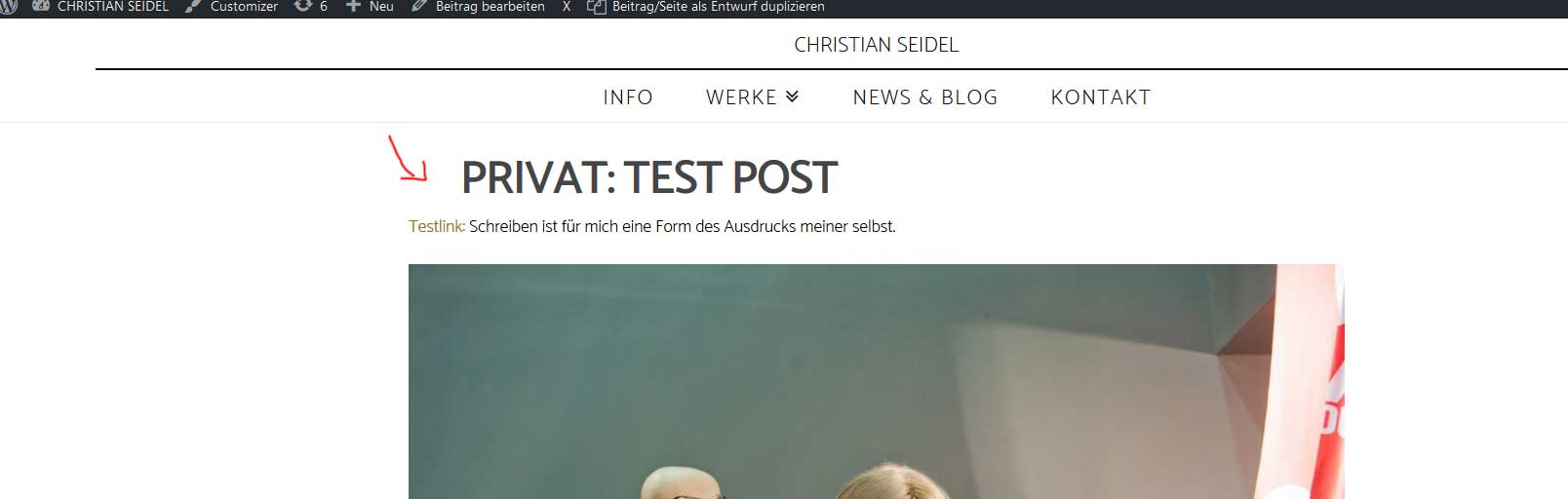
did I forget something?
Thanks!
Hello @blueprint,
Please add following CSS and that should fix the problem:
.single-post .entry-header .entry-title {width: 100% !important;}
Upon adding the code, output would look like similar to the screenshot https://screencast.com/t/voMqUkwX
Thanks.
I’m afraid it didn’t…
Hello There,
You forgot to update this code:
.single-post .entry-header .entry-title,
.single-video_beitrag  .entry-header .entry-title{
    width: 89% !important;
    padding: 0;
    max-width: 1200px;
}
which will be replaced with this:
.single-post .entry-header .entry-title, .single-video_beitrag .entry-header .entry-title {
    width: 100% !important;
    padding: 0;
    max-width: 1200px;
}
Hope this helps. Please let us know how it goes.
Thaks so much! For your patience and the good instructions! That was a huge help!
I really enjoy working with X more and more! Your support is just great!
You are most welcome.