Images re-sizing on page

I’ve been using X Pro to rebuild our site - after setting up a template, I was able to create two pages just fine. Then on the third page, for whatever reason, the images started appearing much smaller than their original size when brought onto the page. In the media library they say they are the correct size, but get reformatted on the page itself. I don’t believe I’ve touched any settings that would have made this drastic of a change – especially since I’ve been using the same template for each page. And I can’t seem to find a way to fix the size once it’s on the page. I’ve tested bringing in new images as well as uploading images that are working correctly on other pages all with the same result: super small, resized images.

Any insight would be appreciated–thanks!
Hi Chris,

I tried to check the URL you have enclosed by it goes to a 404 page (see screenshot in secure note). I also checked the domain that is assigned to the first license but the login details do not work.

For the meantime, please try testing for a plugin conflict. You can do this by deactivating all third party plugins, and seeing if the problem remains. If it’s fixed, you’ll know a plugin caused the problem, and you can narrow down which one by reactivating them one at a time.

Apologies - copied wrong information. Secure note has been updated.

As this is a brand new build, I’m currently not running any plugins.

Thanks!

Hi @chrisstegner,

I am able to access. Though I cannot see the image issue yet because the content builder is not loading due to HTTP/ HTTPS mismatch. Since your site is secure using HTTPS, please go to Settings > General > Set WordPress Address (URL) and Site Address (URL) to use https too.

I have made the HTTP to HTTPS change as suggested. This site is a temp site we are in the very early stages of building so there is not much to see yet.

These two links should help highlight the problem:

Just not sure why my images are all of a sudden getting resized and how to make that stop - thanks!

Hello @chrisstegner,

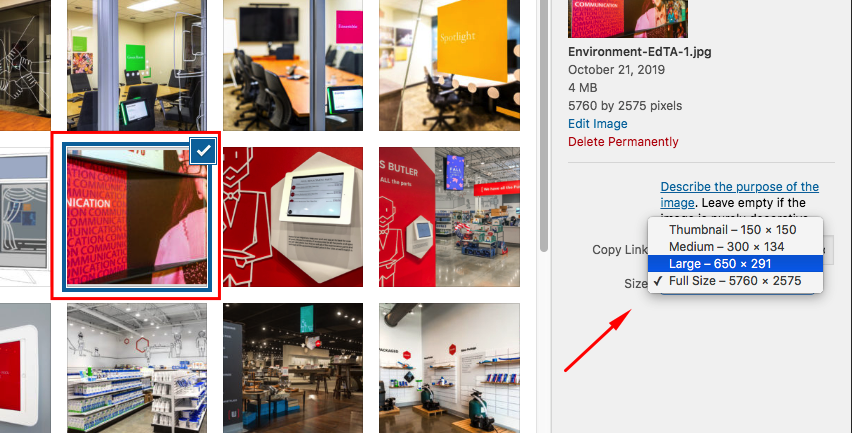
The image did not become small all of sudden. It is just that you have inserted the medium version of the image. When you insert an image, please choose which image size you want to insert.

In the latest release, we made possible that you can select which size to insert. This is very useful when your uploaded image is so big and yet you only need a small size image. You now have the option to use the full original image or the thumbnail, medium or the larg size version of the image. You can adjust these default WP sizes in Settings > Media.

Hope this helps.

Originally, I thought that could be the issue, however, was unable to find where I could change this in the Media Library. I see now that this is done through the editor, when bringing the image into the page itself.

Thank you for your response and all of the help!

You are most welcome!
If you need anything else we can help you with, don’t hesitate to open another thread.

This topic was automatically closed 10 days after the last reply. New replies are no longer allowed.