Image width not working / page padding neither

Hi there,
it would be great if you had a hint:

  1. I just built a page and can’t manage to get the image on top neat: there is kind of a greyish background in top and at the bottom. How can I make that disappear?

And 2. I can’t find the control for “padding” any more, only “margin”. What can I do? I want to reduce the width of text.
THis is the page: https://www.textgold.de/ghostwriting/
Thanks a lot
Karen
Hi Karen,

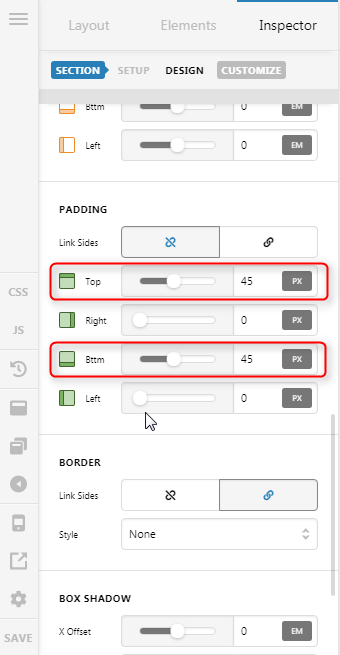
Thank you for writing in, 1) please inspect your Section and set the top and bottom padding to 0


If you don’t see these options on your end, please enable the Advance Mode..

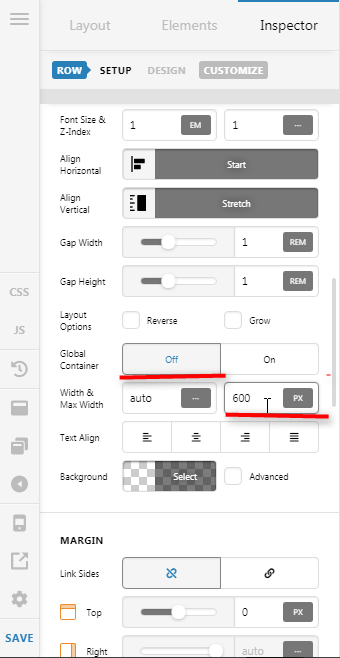
  1. Instead of applying padding to the text. Please inspect the ROW and turn Off the Global Container option and set a Max Width on it.

Hope it helps,
Cheers!

Hi Friech,
what can I say? Apart from: both problems are solved entirely thanks to your help :slight_smile:
Of course I had no clue about “advanced mode”, everything is set and fine now.

Thanks a lot and regards
Karen

You’re most welcome, Karen! :slight_smile:

This topic was automatically closed 10 days after the last reply. New replies are no longer allowed.