Is it possible to achieve something similar to the image attached? I’d like to have: 3 rows with an image to right of them that spans all 3 rows. 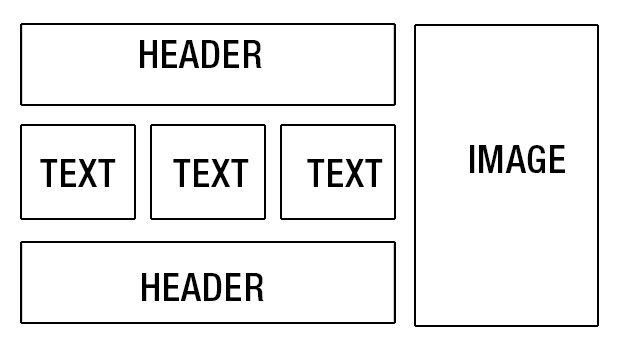
Hello There,
Thanks for writing in! Yes you can achieve this layout when you create the page in Cornerstone. Please do the following:
1.) Please create your section and a row.
2.) Your row must have a two column row with 3/4 + 1/4 layout.
3.) In your right column, you can insert an image element.
4.) In your left column, you will need to insert a custom header element, a classic block grid and another custom header element.
5.) You will insert the tree column text in each of your block grid items.
For best result, please review this video:
Hope this helps.
1 Like
Thanks. I made a huge leap forward. Just so that others that follow will know:
2.) Your row must have a two column row with a “Custom” 3/4 + 1/4 layout.
The only problem I have now is that the video is dated. X Pro no longer has a Block Grid element (hence why you said to use a “Classic Block Grid” element). However, when I use a Classic it creates rows and not side by side columns. Do I need to utilize Shortcode from here: http://demo.theme.co/integrity-1/shortcodes/block-grid/ ?
Is there a better solution to get a 3 box Block Grid?
Hello There,
Thanks for updating in! The Classic Block Grid is the best option. This element will still functions like a 3 column grid. In Cornerstone preview it may look like they are in rows but actually they are in columns in the final output. Please check out my test page screenshot:

Hope this helps.
This topic was automatically closed 10 days after the last reply. New replies are no longer allowed.