Hello
I put in style in cornerstone the size and when I put the link in the classic image the size of the image change.
the website is https://www.laforetlanguages.com
Thank you
Hello @FERLAF,
Thanks for writing in!
This issue is one of the drawbacks in using the classic image element. To resolve your issue, please add the following CSS code in the X > Theme Options > Global CSS (http://prntscr.com/evui3r)
a.x-img.x-img-link>img {
    height: 100%;
    width: 100%;
}
We would love to know if this has worked for you. Thank you.
Thank you for your answer. I tried but it is not working
Hello @FERLAF,
I have logged in to your site. The css code did not work for you because there are broken css codes present which have affected the rest of your custom css:
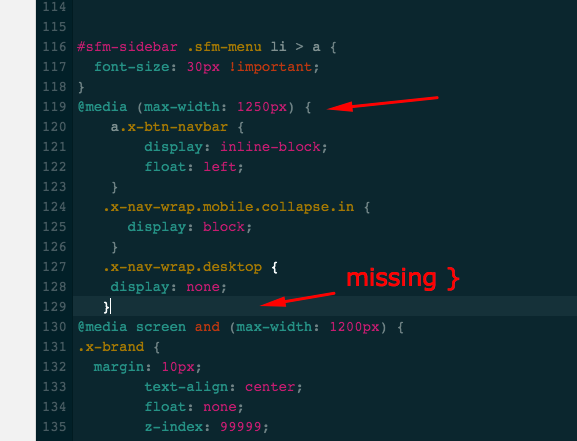
I have moved the code to the beginning of all your custom css. And then I also found out that you added a PHP code in the custom JS section which is not the correct way. You have added this:
add_action( 'after_setup_theme', 'setup_woo_gallery' );

function setup_woo_gallery() {
  add_theme_support( 'wc-product-gallery-zoom' );
  add_theme_support( 'wc-product-gallery-lightbox' );
  add_theme_support( 'wc-product-gallery-slider' );
}
You are suppose to add this code in a child theme. This is a template customization and we would highly to suggest that you use a child theme. This allows you to make code changes that won’t be overwritten when an X update is released. After your child theme is setup, please review how we recommend making template changes in Customization Best Practices.
Hope this helps.
Thanks a lot.
You are most welcome!
This topic was automatically closed 10 days after the last reply. New replies are no longer allowed.