While I know that I can use CSS to do an image rollover, I cannot actually find the setting in X anywhere - the “image” element does not seem to support this most basic feature (but I’m hoping I missed it somewhere).
Help please - thanks very much!
While I know that I can use CSS to do an image rollover, I cannot actually find the setting in X anywhere - the “image” element does not seem to support this most basic feature (but I’m hoping I missed it somewhere).
Help please - thanks very much!
Hi @jagelman,
Thanks for writing in.
What do you mean image rollover? You mean changing the image upon rollover or hover? It’s like switching static images and as a background since it’s not gonna work on standard images. I recommend contacting a developer for this kind of customization.
Thanks!
Hi
Here is an example of what I mean:
There is a B&W image of a fish; when the mouse pointer ‘rolls over’ that image, then it becomes a color image of the fish.
This “rollover” is one of the most basic functions for web-based images, referring me to a developer seems a bit excessive. I am assuming its just a setting in X somewhere, but I cannot locate it.
Hope this clarifies my questions, thanks very much for your help 
Joshua
Hi There,
Thanks again for writing in!
we are really sorry that feature is not available in the cornerstone.
You can do it in custom CSS. Just add a class name to the image element.
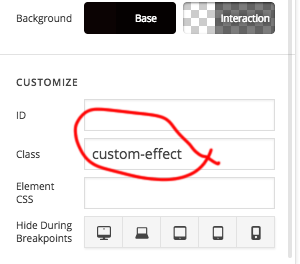
Add this CSS to your X->Theme Option -> Global CSS and you can use that class in the different place too.
.custom-effect {
    -webkit-filter: grayscale(100%); /* Safari 6.0 - 9.0 */
    filter: grayscale(100%);
}
.custom-effect:hover {
    -webkit-filter: grayscale(0); /* Safari 6.0 - 9.0 */
    filter: grayscale(0);
}
Hope this helps!
Thanks so much!!!