Image info content becomes hidden on mobile

Hi,

The entire info content text that pops up when you hover over an image, isn’t displayed from mobile. A part of the text becomes hidden behind the following image in the section. It looks correct from desktop though. Please see attached screenshots of desktop vs. mobile. What to do? :slight_smile:

This is the page: https://getmeetio.com/meetio-team/

Thanks in advance,
Felicia @ Meetio

Hi there,

Thanks for writing in! Can you please try adding the following CSS rule into your page, CSS area.

.x-img.x-img-link.x-img-circle {
    z-index: 1032;
}

Hope that helps.

Thanks for your quick reply! :slight_smile: Unfortunately it’s not working, I have checked in mine and a colleagues phone :confused: I think I’ve added the rule correctly (see attached screenshot).
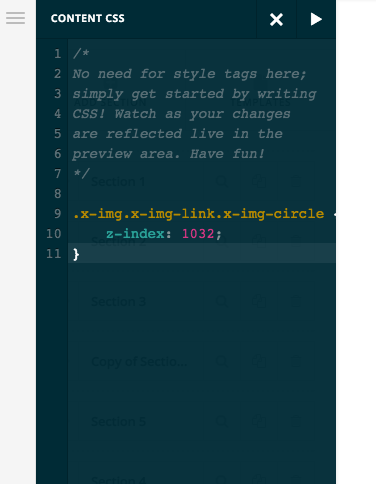
/Felicia

Hi There,

Please add the following code instead:

@media(max-width: 769px) {
.popover {
  
    text-align: center;
    width: 100%;
      position: relative!important;
}}

Let us know how it goes

Thanks

That works perfectly! Thanks :smiley:

You’re welcome :slight_smile:

This topic was automatically closed 10 days after the last reply. New replies are no longer allowed.