Using the Image Element, for some reason I can’t get an image to go all the way across the screen left to right. http://lincolnveteransparade.org/
Hi @rkassebaum,
Thanks for posting in.
May I know which image? What I see are two background images which already in full-width across the screen.
You may also turn off the inner container of your section’s row to make sure the layout area is full-width.
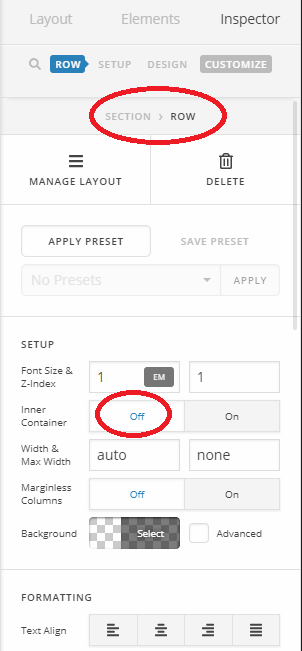
Thanks!
Say, I added an image of a google map on the home page. I believe I have set like you illustrated. However, I’m still getting white space on each side of the image if the page is wide enough. Suggestions? http://lincolnveteransparade.org/
Hi again,
Try this, give your section a class e.g fullwidth-section and then add the following code in the Theme Options > CSS:
.fullwidth-section .x-image, .fullwidth-section .x-image img {
    width: 100%;
}
Let us know how this goes!
This topic was automatically closed 10 days after the last reply. New replies are no longer allowed.