iLightbox for video - text link

Hi all,

I’m trying to recreate the way a video pops up from a button, but after clicking a menu bar text. Right now i’m using the built in shortcode for light boxing a video and it works great on the front of my homepage with a button. Any tips for doing the same thing but from a text link on the menu bar?

site is here: Link is play reel

Hi there,

Thanks for writing around! Here is the code that I use in text editor to open up light box via text link :

<a href="https://theme.co/apex/app/themes/x-member-area/images/public-member-side.png" class="link-lightbox">Trigger LightboX!</a>

[lightbox selector=".link-lightbox"]

You can also see this https://theme.co/apex/forums/topic/text-link-to-open-image-in-lightbox/#post-389269

Hope this helps!

Thanks for the response. That’s essentially what I’m doing now in the menu, and if you notice, the lightbox pops up full screen as if it’s an image. Since this is a video, I need to somehow add the button attribute [lightbox_video=“true”] to this so it knows its a video. I think that attribute only works in the button class? This is what I have for the button:

[button class="lightbox" href="https://www.youtube.com/embed/6-We-k388vw" lightbox_video="true"]PLAY 
REEL[/button]

This is what I have for the menu text:

<div class="lightbox" href="https://www.youtube.com/embed/6-We-k388vw">Play Reel</div>

The lightbox_video=“true” doesn’t seem to affect the text link at all.

Hi There,

You should add the class to the menu item. On Appereance > Menu

You have a CSS class box for each menu item.

You can then link the menu item to your video.
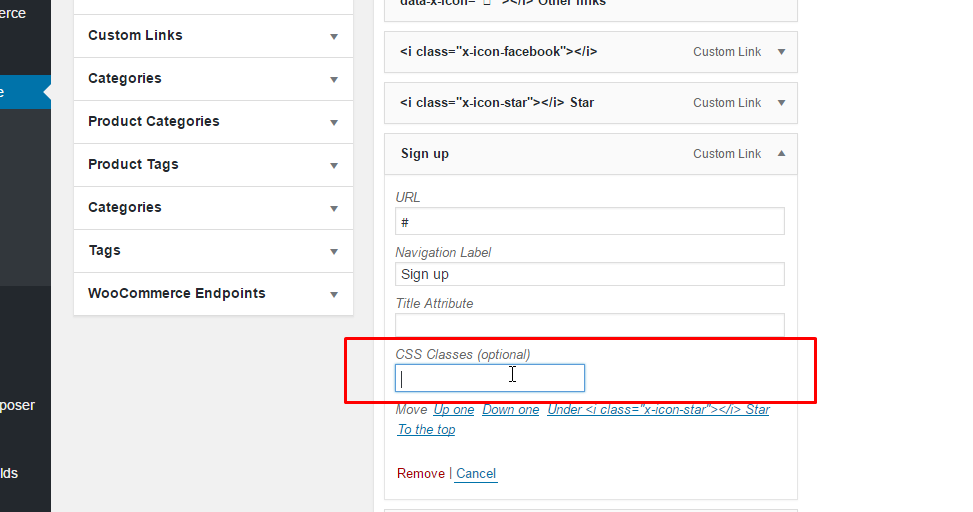
If you do not see any class field, press Screen Option on the upper right of menu page and enable the CSS Classes
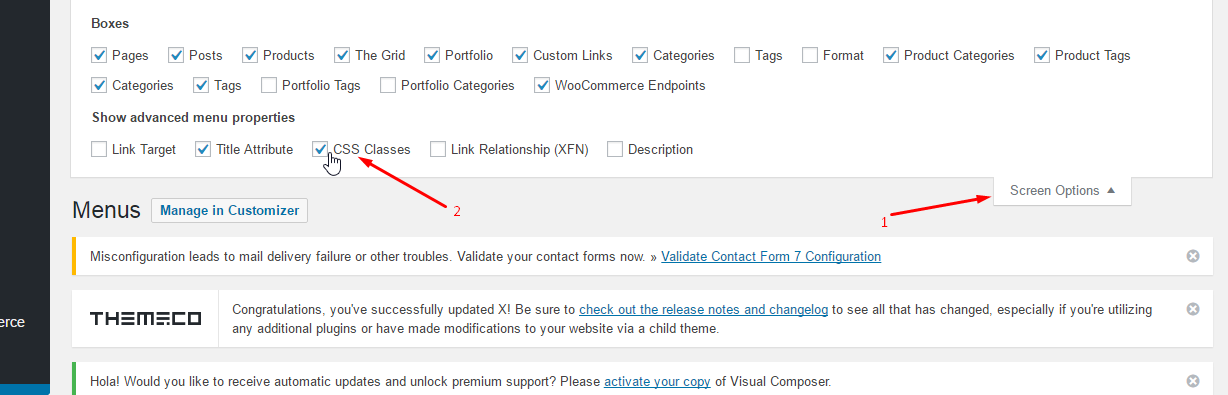
***** You should add the lightbox selector to each page:

[lightbox selector=".lightbox"]

This approach will bring you a problem o your blog page, if you use the Wordpress blog since it is not editable, I would reccomend using a normal page as your blog page and using Essential Grid or The Grid to show your posts, that way you can still add a lightbox selector.

A good alternative would be to use ConvertPlug to display your video. It would avoid that you need to add a lightbox selector to each page and also gives you a cool popup video effect

Let us know how it goes.

Thanks
Thanks. This didn’t help, so I ended up finding another pop up plugin that did what I needed.

Okay great!
Thank you very much for letting us know that you have used another plugin for your site.

This topic was automatically closed 10 days after the last reply. New replies are no longer allowed.