Icon on menu not showing active (2)

Repeating question. The original one was closed

Thank you

Hi there,

Quick thing. When I add an icon on the menu when that option of the menu is active, the icon looks not active but the text does.

How can I make the icon look like it is active the same as the text?
Thanks

ANSWER I GOT (It is not working)


Please add this code in the Element CSS of the Inline Navigation element:

.current-menu-item $.x-menu > li > .x-anchor .x-graphic-icon {
    color: #000;
}

Please change the color value to your color preference.

Hope this helps.


Thank you, it didn’t work
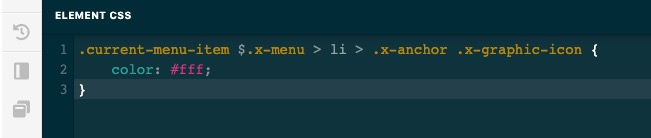
iDBImage_CL1937 2020-03-08 at 10.37.02 PM

Hello @Iban,

Thanks for posting in!

There was a typographical error on the code. Please have it updated and use this:

$el.x-menu > li > .x-anchor .x-graphic-icon
$el.x-menu > li.current-menu-item > .x-anchor .x-graphic-icon {
    color: #000;
}

If this is NOT helping, provide us access to your site so that we can check your settings. Please create a secure note with the following info:
– Link to your site
– WordPress Admin username / password

To know how to create a secure note, please check this out: https://theme.co/apex/forum/t/how-to-get-support/288

Regards.

This topic was automatically closed 10 days after the last reply. New replies are no longer allowed.