Icon list shows bullets

Hi

I have a website with a few icon lists. On one page the first column consistently shows bullets as well as the icons.

I already checked that it is not caused by custom styling or plugin conflicts. I have even rebuilt one row as a V2 row, but nothing changes. Can you give me some advice?

This is the page it appears on: https://www.tygerhoekretreat.co.za/wildlife/

Hey @designbythink,

The HTML output of the Icon List doesn’t look right so you probably had accidentally removed something from the HTML or had written incomplete HTML within the list item.

Please try inspecting the Icon List content first. If you can’t find the cause, please give us the following info in a Secure Note

  • WordPress Login URL
  • Admin username and password

You can find the Secure Note button at the bottom of your posts.

Thanks.

Hi

There is no HTML in the list items, so I don’t think it’s that. It has something to with the positioning of that icon list, as whichever list is put first in a row will have the extra bullets.

I will add logins in a secure note.

Hello @designbythink,

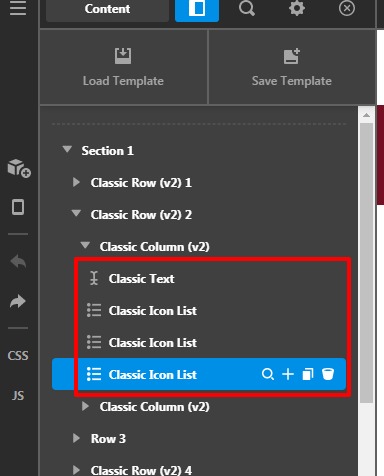
Thanks for sharing the credentials. I went ahead and checked your page content it seems that you have set a blank Classic Icon list in the page content, there might be some issue with setup on the blank Classic Icon List I went ahead and deleted these elements from the page content and it worked fine. There might be a settings issue in the “Classic Icon List” I would suggest you check its settings or delete it in case if you are not using it.
Please have a look at the given screenshot below.

Wildlife-Content-X

Hope it helps
Thanks

Thank you! I would never have found that on my own. No idea how they got there, but removing them fixed the problem.

Hi @designbythink,

Glad that we are able to help you.

Thanks

This topic was automatically closed 10 days after the last reply. New replies are no longer allowed.