Hi there.
I just updated X and cornerstone to their latest versions today, and now, some of the icons in my menu do not display. Can you help?
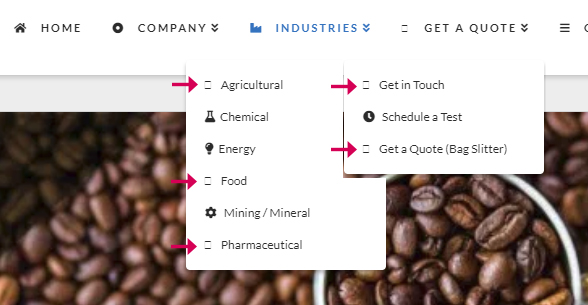
Hi there.
I just updated X and cornerstone to their latest versions today, and now, some of the icons in my menu do not display. Can you help?
Hi There,
Can you please confirm that you have clear your Plugin Cache or Server cache if you have any after update?
If you are using any caching plugin please flush the cache there. Also if you have any server level cache system please clear that too.
This might be a caching issue as new version of the theme is using new font awesome.
Please let us know.
Thanks
Hi there,
I use “WP Super Cache” to clear the cache, is this a recommended plug-in?. I also cleared the cache from my browser and got the same results. I checked the mobile version and still have the same problem. I’m not sure what else I can do, any other suggestions? Thanks!
Hello @luxmedesigner,
Thanks for updating the thread. 
I checked your website and looks like the problem is resolved now. I can see icons showing up on the website. Please see screenshot.

To clear cache of WP Super Cache plugin, please take a look at following article:
https://wpshout.com/quick-guides/delete-cache-wp-super-cache/
Thanks.
This topic was automatically closed 10 days after the last reply. New replies are no longer allowed.