Hi Bjorn,
You have a unique use case, that is why the icon inside the border sits at the top. The icon itself is added using the :before CSS line and to force that to be centered you need to add the CSS code below:
[data-x-icon-s]:before {
    content: attr(data-x-icon-s);
    transform: translateY(-50%);
    display: block;
    margin-top: 50%;
}
The code above will affect all the icons and it might cause side effects on other sections of the website. That is why I suggest that you click the Customize tab of the icon element that you used and add a unique class there, such as chr-centered.
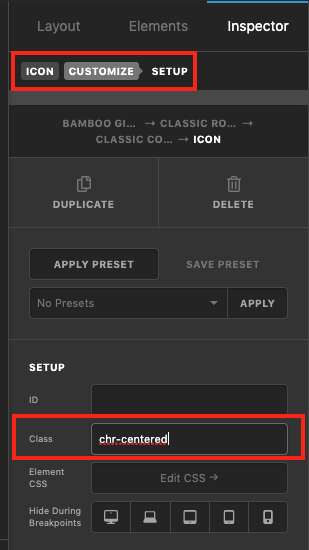
Then you will need to change the CSS code to:
.chr-centered[data-x-icon-s]:before {
    content: attr(data-x-icon-s);
    transform: translateY(-50%);
    display: block;
    margin-top: 50%;
}
You can add the CSS code to X > Theme Options > CSS.
Thank you.

