I wish to use the circle option but it makes oblongs

I am trying to show images in the circle option but the image keeps being shown as an oblong.

I have made the images a square shape i.e. 635 x 635 thinking that it would convert to a circle quite simply but no that is not the case. Can anyone please help me?

I am uploading a screenshot of what I currently see
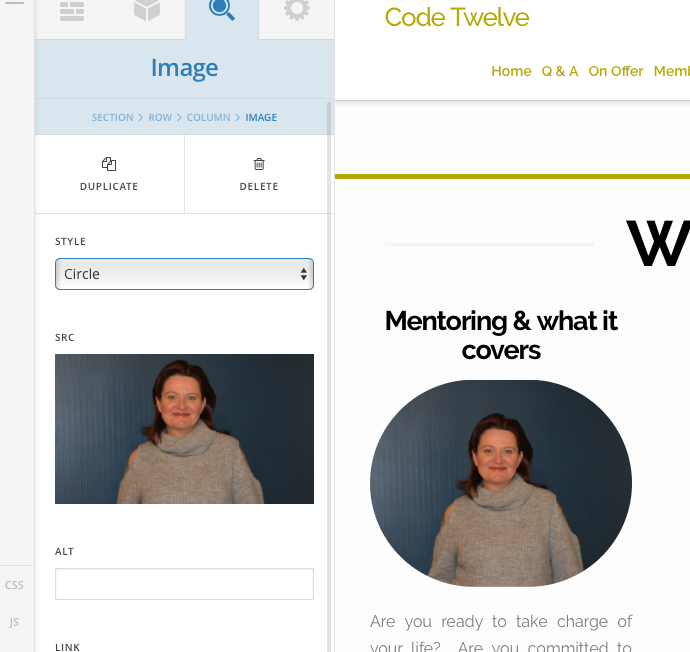
This is what I am attempting to create - it was done by a friend who is unable to be contacted at the moment for personal reasons.

I know it can be done I just don’t know how.
Thanks Heather & Louise

Hi There,

Would you mind providing us with login credentials(by clicking on the Secure Note button at the bottom) so we can take a closer look? To do this, you can make a post with the following info:

  • Link to your site
  • WordPress Admin username / password

Thanks.

Hi @thai

Apologies for the late reply - I have used the secure note at the bottom of my original contact to send the relative information.

Louise

Hi Louise,

Thanks for the update. You’re doing right just add the following code in your Customizer via Appearance > Customize > Custom > Edit Global CSS:

.x-img-circle, .x-img-circle img {
    border-radius: 50% !important;
}

Make sure the image you want to be a perfect circle has the same dimension for example 635 x 635px .

Let us know how this goes!