I am definiley a Newbie to the X theme. I cant figure out how? I need all the white background to be Grey. My site is [http://gormanconstructioninc.com/] . Thank You for any help you can give.
Hi There,
Upon checking your website, I could see that there is an incorrect HTML code in the topbar content.
Could you please change the topbar content to the following code below?
<a href="tel:770-439-9400">Call Us (770) 439-9400 </a>
<a href="[email protected]?Subject=From+website">Email Us</a>
To change the background color of your website, please navigate to X > Theme Options > ACKGROUND OPTIONS > BACKGROUND COLOR > change the color:
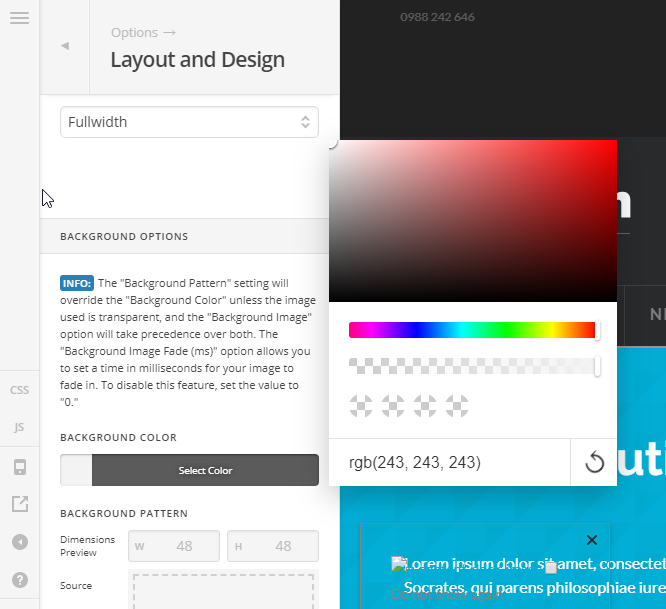
Let us know how it goes!
Thanks but going to where you lead me I have it set to Grey but there is all kinds of White still showing. I did correct the TopBar thanks.
You’re welcome.
Thanks but going to where you lead me I have it set to Grey but there is all kinds of White still showing. I did correct the TopBar thanks.
Hi @james4330,
Upon checking your setup, I could not see white background anymore.
Would mind sharing us a screenshot if I missed the white background.
Thanks.

Hi again,
Thank you for the screenshot, please add the following code in the Theme Options > CSS:
.hentry .entry-wrap, .search-results .x-container>.product .entry-wrap {
    padding: 0 !important;
}
For your other section spacing, I see you’re using HTML table to create a column list, It equally divides the columns that’s why you see space in between, however you can try reducing the width of your table. To do this, please give your table a class e.g my-table and add this code to Theme Options as well.
.my-table {
    width: 75%;
}
Hope this helps!
This topic was automatically closed 10 days after the last reply. New replies are no longer allowed.