I can't see how to change a graduated colour in Essential Grid using the George Bush skin!

Hi, I’m using Essential Grid to display my blog posts on my the Home page of my website and I’m using the George Bush skin and I’ve been searching for ages on how to change the colour behind the title but I can’t find out how to do it! I’ve managed to change the top of the graduated colour to blue, but I can’t find where the black colour it fades to so I can change it, as I don’t want it to be graduated! I’ve tried looking on the Theme Punch documentation for it, but can’t find anything on it.

I’ll put the URL in a secure note as it’s being built on a temporary link.

If you scroll to the very bottom of the page, above the blue footer, there are 3 images with text over the top, this is what I’m referring to.

Thanks!
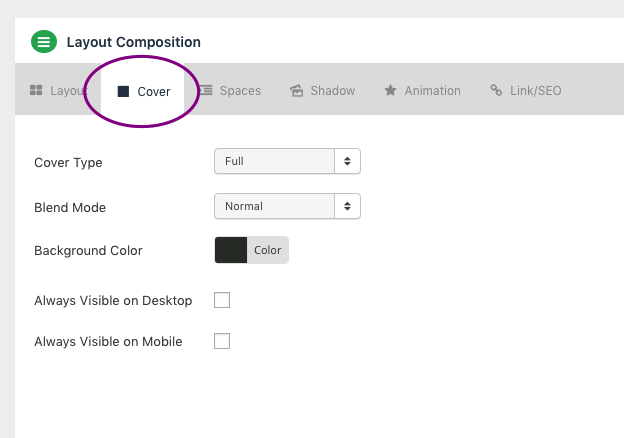
Hello @core365,

Thank you for your post details. I have checked your grid skin and I found out that the black gradient is coming from the Cover’s background color.

Hope this helps. Please let us know how it goes.

Hi, I’d already changed that to the blue and I’ve got the blend mode set as ‘Multiply’, but there’s a black at the bottom of the box that graduates upwards and I don’t know where this is coming from! I even changed the blend mode to ‘normal’ and I could still see the black coming through at the bottom as the blue is still transparent for some reason.

Thanks!

Hi @core365,

It seems that the default background color of skin, please try adding the following CSS under Theme Options > CSS:

.eg-georgebush-wrapper .esg-entry-cover {
    background: linear-gradient(to bottom,rgba(0,0,0,0) 50%,rgba(191, 128, 128, 0.83) 99%,rgba(154, 12, 12, 0.85) 100%) !important;
}

Hope it helps :slight_smile:

Hi, that’s great, thank you!

Thanks for all your help!

Glad we were able to help :slight_smile:

This topic was automatically closed 10 days after the last reply. New replies are no longer allowed.