HTML question about a block

Good morning,
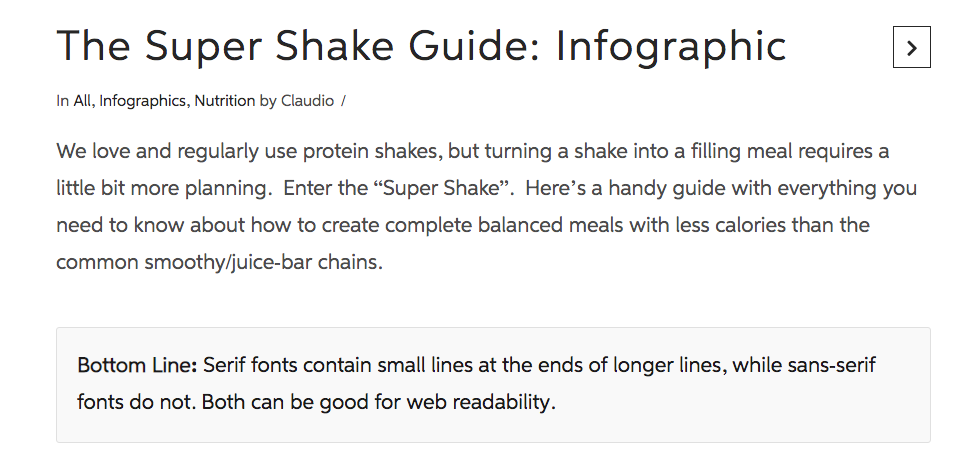
I’m trying to create something using html that I received from someone that does a similar feature on their own website. I want to create something similar to a blockquote but without the padding on the bottom for where the author of the quote gets displayed. The block I’m trying to create is called “bottom-line” and looks like the “Bottom Line” blocks on this website:

The html I got from the owner of that site sent me this:

Add text

.entry-content p.bottom-line { color: #222; border: 1px solid #e6e6e6; border-radius: 3px; background-color: #fafafa; padding: 20px; }

But when I add that to my customizer on X and try entering the Bottom Line: insert text here, it just shows the text and not the block visual around it. When I use similar html code for my blockquotes in X, it works fine.

It appears the html syntax that I pasted above gets modified or reformatted, so I uploaded a screenshot of the syntax.

I apologize- it also looks like the url I gave you above won’t work either because it was redirected from an email campaign. This is the generic url that shows the bottom line boxes.

or an image of it here:

Hello @perfettc,

Thanks for writing in!

Do you want something like this?

Your custom css will be this:

.entry-content p.bottom-line {
  color: #222;
  border: 1px solid #e6e6e6;
  border-radius: 3px;
  background-color: #fafafa;
  padding: 20px;
}

And your paragraph html code should be this:

<p class="bottom-line"><strong>Bottom Line:</strong> Serif fonts contain small lines at the ends of longer lines, while sans-serif fonts do not. Both can be good for web readability.</p>

If you already have this yet still not applying to your site, then most probably you have a caching issue. Please keep in mind that since you have installed a caching plugin WP Fastest Cache, You must your plugin cache and regenerate the minified JS/CSS files before testing your site. This can cause the changes to not take place on the front end. It will eventually show up when the cache regenerates, but it’s not ideal if you’re looking to see your changes immediately. Caching plugins are best to turn on only when you’ve finished building the site.

Hope this helps.

Thank you so much! :grinning:

You are most welcome. :slight_smile:

This topic was automatically closed 10 days after the last reply. New replies are no longer allowed.