Ok… with thanks to Josh D and Gary on the Pro Theme FB users group…
All sorted… with an Archive layout and ACF CPT and ACF Taxonomies (and no code)…
Simply put:
- Setup an archive (set the Settings to Post type = your custom post type)
- Setup your form
- Enable Ajax and add a change selector that targets the content area (where you have the looper consumer).
This can be an ID (#post-list) or a class (.post-list) - matched to your content area container
- Add a checkbox list or radios, or whatever and set the name to your taxonomy key
*** The Checkbox List name (General: Name must exactly = the ACF Taxonomy Key***
(Shame this was not in the documentation at release - it had only the Category_name example for a post)
- Add a looper provider on the checkbox options
Value = {{dc:term:slug}} ** this is a bit different in the CS FORMS provided template for filtered archive
Label = {{dc:term:name}} ** Documentation says title not name
- For those Loop All Terms and select the individual taxonomy
- Consume on the option as well and you should see items showing up
- Then simply change the dynamic content for value to the term slug and for the name to the term name and you should be in business
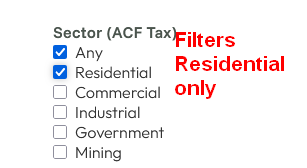
Re the “Any” Checkbox List options… these work when there are multiple taxonomy checkbox lists / category lists.
(Note - The “Any” option is included in the CS FORMS provided template for filtered archive, which is for POSTS and POST Category)
It would be nice if when selecting the “Any” checkbox, all of the currently selected one in the same list automatically de-selected… as have “Any” does not seem to overide any other selected individual values.
And for end user clarifty… vice versa.
thanks again for CS FORMS! Looking forward to lots of little udpates and further improvements 


