How to turn off ancestor highlight when same link is used in 2 different menu categories

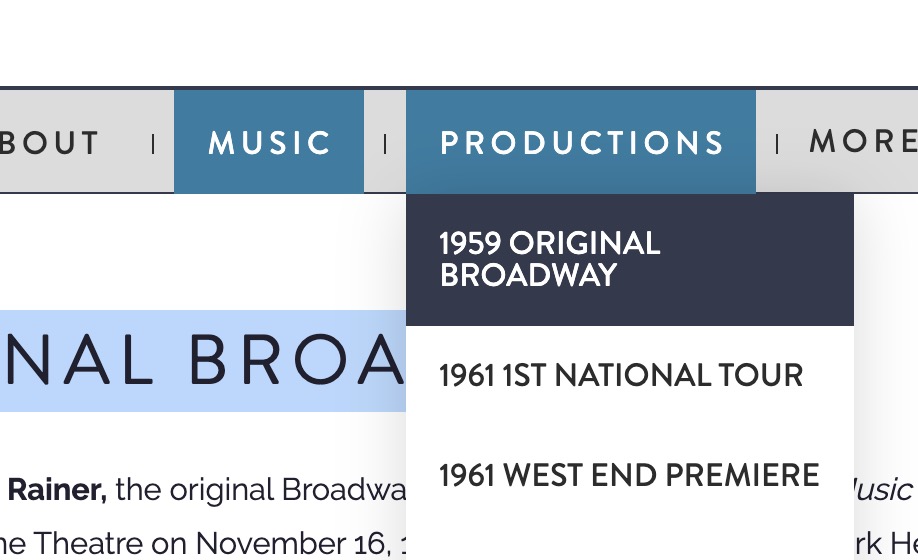
I have a dropdown menu setup that has the same link used in 2 different places but with different link names. Records and Productions pointing to same link. The issue is when this happens I get 2 different ancestor links that are active. I only want the one link to look active (Productions). I do NOT want Music to be highlighted.

Example here:

https://rnhfanstage.wpengine.com/production/1959-original-broadway/

Hello @wowflak,

Thanks for writing in! The menu items were highlighted because both of them are the current menu parent of the link 1959 Original Broadway page. If you want to remove the highlight of the Music, you should not be using the same link for you sub menu item.

Both of these submenu items links to the same page:


Hope this explains your issue briefly.

Hi

Thanks, I understand that. But I want to use the same link. So is there a way to force it to always reference “Productions” over “Music”?

Hi @wowflak,

There’s no settings in our theme to do that and this would require customization. Regretfully, providing customization is outside the scope of our theme support. You may seek 3rd party developers to help you with your problems or you can avail One where we can answer questions outside of the features of our theme.

Hope that helps and thank you for understanding.

This topic was automatically closed 10 days after the last reply. New replies are no longer allowed.