Hi, for some reason it is missing Admin Bar / Toolbar at the top of the page, and the option on the user settings when I select it, it deselects itself when I save the changes.

Hi, for some reason it is missing Admin Bar / Toolbar at the top of the page, and the option on the user settings when I select it, it deselects itself when I save the changes.
Hello @Iban,
Thanks for writing in!
To resolve your issue, please go to Users > All Users. Find the “TA” user account and click edit. In the profile editing page, you will need to enable the “Toolbar” option.
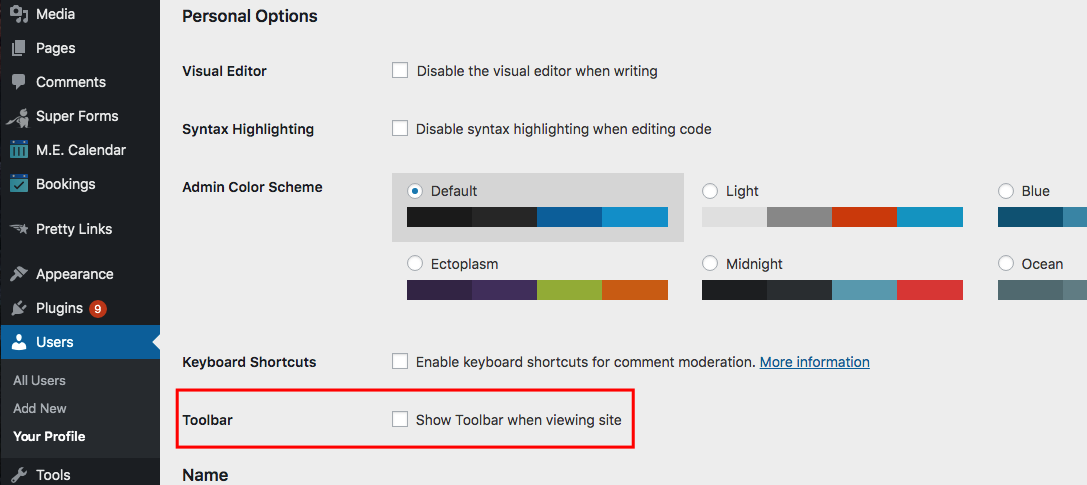
Hope this helps.
Thank you
Yes, that is the picture that I added too. The problem is that when I select it and save it, it deselect itself, so it is not working for TA
Hello @Iban,
Yes, I can confirm it. It is also happening with the Apex account. This could be caused by a 3rd party plugin. You could try testing for a plugin conflict. You can do this by deactivating all third party plugins, and seeing if the problem remains. If it’s fixed, you’ll know a plugin caused the problem, and you can narrow down which one by reactivating them one at a time.
Kindly let us know how it goes.
This topic was automatically closed 10 days after the last reply. New replies are no longer allowed.