How to: Show logo in navbar but delete navigation (text and bar)?!

Hi,

I use integrity for years now and I would like change my site a little and like to display only my logo in the ‘stacked’ navbar. Next to that I want to use the Superfly menu.

Of course I can choose a layout without ‘header’ but then I don’t have my logo centered on top (in white).
Specially on the portfolio-page where I can’t choose to display without header…

So, what to do if I want to use superfly menu AND place my logo in a white bar on top of all pages?
And what to do in Mobile view? The hamburger menu of Integrety pops up. Can I turn this of and use Superfly? Or do I need to set Superfly to off and use the hamburger of integrity? What has a different design and that would be a shame.

As always i’m sure you guys know the solution :slight_smile: Thanks in advance

Hi There,

Please add the following CSS to Theme Options CSS and activate Superfly

.x-navbar {
display: none;
}

Hope it helps

Hi,

Great.
This works!
Is there a code so the the logo is sticky? I mean it stays at the top even if I scroll the page below?

Hi there,

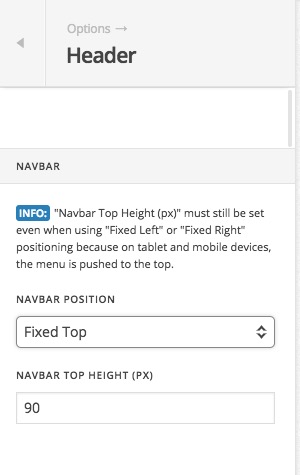
Sticky functionality can be activated from the options. Kindly go to X > Launch > Options > Header > Navbar:

and change it to Fixed Top.

Thank you.

Hi Thank you so much but this does not work. It is not fixed…
But may there is another problem…

I started this site once (long ago) with visual composer (bakery) and along the way I also changed stuff with cornerstone (it did not gave me any problems then… But now i’m in deep shit :wink:

I really would like to convert everything to cornerstone and don’t work with the bakery composer anymore (i want to delete this plugin) Is there a way to do a clean conversion? And maybe this also will solve the problem of the logo which will not ‘stick’ for now ;-(

Thanks anyway and have a great day.

Hi There,

To make your logo bar sticky, please add the following code to Theme Options CSS

.x-logobar {
  position: fixed;
  width: 100%;
}

Regarding changing your pages from VC to CS you need to re-create your pages on CS.

It is not really hard because you already have the original design done, so you can skip the creative moment and just replicate, of course, it involves work, but I do believe it is a fairly fast process since you have the design to copy and the images ready to use.

Hope it helps