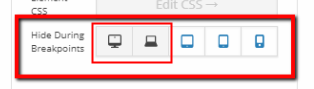
How to setup a header to show only for PC desktops using PRO headers ? I mean not using it for mobile phones or ipads. I wish to use the superfly menu option . Hide for PC ( using my pro header for them ) and show to mobile ( showing the superfly menu ) . Which options i must select to be hiden for the header ? I attach a photo of the selecting devices . From which device superfly is going to show the menu ? ( in order to deselect from it ) thanks