Hello! How to set up base EM? It seems the 1em=20px, not 16. Is it possible to change that?
Hi Konstantin,
Thank you for writing in, An em is equal to the computed font-size of that element’s parent. If no font-size defined on the parent element, then navigate to Theme Options > Typography and set the Root Font Size

Hope it helps,
Cheers!
1 Like
Wow! That wonderful! Now I’ve understood!
So if I’ve set up font size in theme option in PX can I still use em?
I like how it converts for mobile devices! It’s awesome feature of your theme! =))
And what is this?
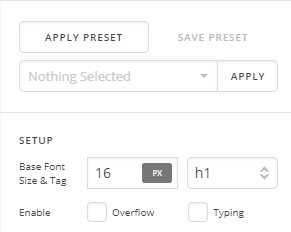
Hi Konstantin,
Yes you can, actually you should use em or rem to your text element so they will dependent to the ROOT FONT SIZE you set in Theme Options > Typography
You mean the Base Font?
Please keep that to 1em.
If you want to adjust a text font-size, please use the Font Size option under the Text Format instead.

That Base Font is useful if you have multiple font-size option on the element, like the headline element that has a Text and a sub-text, and the graphic font-size.
Hope this shed some lights,
Cheers!
1 Like
Yeah! You’re awesome! I love my site now! =))) I’ve understood everything! =)))
You are most welcome. 
This topic was automatically closed 10 days after the last reply. New replies are no longer allowed.