How to remove the gab below the nav bar?

Hi Guys,

I’ve spend the last few hours scouring through forums and google trying to remove this little gap however with very little avail. I don’t consider myself a noob with websites, coding, and whatnot however i just cant seem to get this one.

I’ve attached a picture showing the area i mean, and the gap in red is the part that I’m trying to remove.
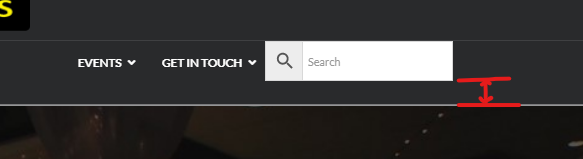
Annotation 2020-06-08 154757

Greatly looking forward to your replies.

Cheers!

Hi Michael,

Thanks for reaching out.

It’s a conflict between stack styling and your plugin’s search form, please add this CSS in Theme Options > CSS to fix it

.aws-container .aws-search-form {
margin: 0px !important;
}

Thanks!

Worked a treat! Thanks Heaps!

We are delighted to assist you with this.

Cheers!

This topic was automatically closed 10 days after the last reply. New replies are no longer allowed.