How to remove the container on mobile menu (burger) + change footer colors

Dear team,

on my website: https://www.girisunyata.org/
I’m trying to remove the square container around the mobile burger menu. To leave just three lines. I’m using pro but no custom header or footer, just the one that’s there from the start.

I’ve found a way in the forum to get it in the right color by using the following CSS. But wasn’t able to figure out the other part.

This code:

.masthead-inline .x-btn-navbar {
color: #8a483a;
margin-left: 15px;
margin-right: 15px;
}

Also, I found this code to change the background color of my footer:

footer.x-colophon {
background: #ffebcd;
}

Would it be possible to adjust the colors the menu, extra text, hover etc?

Thank you in advance,
Darryl

Hello Darryl,

Thanks for writing to us.

To remove the square container around the mobile burger menu please add this custom CSS code under Pro-->Theme Option --->CSS

@media(max-width:979px){
.x-btn-navbar.collapsed:hover {
background-color: #ffffff;
box-shadow: none;
}
.x-btn-navbar.collapsed {
background-color: #fff;
box-shadow: none;
}

}

To change the footer background colour you can use some custom CSS code under Pro–>Theme Option --CSS. To get the colour code you can select colour from this site as per your design.

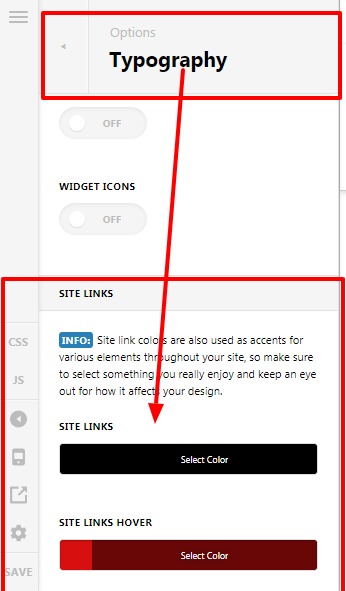
To change the menu colour and hover colour of the text you can set the colour from Pro–>Theme Option–> Typography Site Links

The purpose of providing the custom CSS to show you how to add CSS code to your site. Writing custom CSS is outside the scope of our theme support. If you need more customization, you need to learn CSS and learn how to use the browser’s element inspector.

Thanks

Dear team,

Thanks a lot for the advice. Works great, really happy with the result!

However, there’s one thing, somehow the (notorious) red line right below the Rev Slider headers below masthead is back. Prior to adding the additional CSS for the burger menu and footer color, it was ok, now it reappeared again.

I still have the CSS in place, double checked it on multiple CSS guides online. Really can’t figure out why this is happening. I cleared total browser history and cache on all devices, purged hosting cache. Still, the line is there.

In the backend / preview the line is gone, yet when I visit the website on different devices it’s there.

Could you please advice me on how to fix this?

I attach Code used and login if needed.

Thank you in advance,
Darryl

Hi Darryl,

To get rid of that red line, you need to add the following custom CSS code to Theme Options > CSS.

.x-slider-container.below
{
    border-bottom: none !important;
}

Remember that the above code will work if copied as it is and don’t conflict with any existing style.
Please note that the code provided serves only as a guide to help you get started custom coding on your own if there’s no option offered in our theme or the products we bundle.
We do not provide support for custom codes that means we can’t fix it in case it conflicts with something on your site nor will we enhance it.

Thanks

Dear @tristup,

Thank you very much.
I’ve now copied the code provided in the content CSS of every page with a header on it instead of only in the global CSS. Turns out, that did the trick!

Thank you again for your help. Really appreciate it!

Darryl

Hi Darryl,

Glad it works for you.

Thanks

This topic was automatically closed 10 days after the last reply. New replies are no longer allowed.